
You run a store with a few hundred SKUs and no media buyer. Five different tools have called themselves a "Meta ads agent" in your inbox this month, and every one promises to make ads for you.
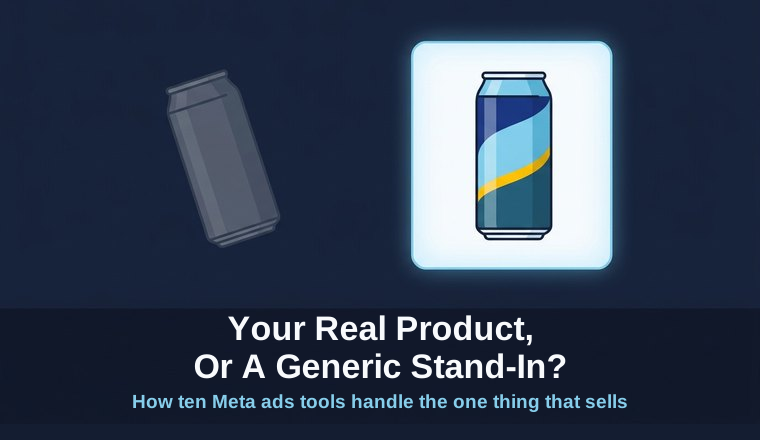
None of them answered the question that decides whether the ad works: when it goes live, does it show your actual product? The real branded can on your shelf, or a generic look-alike the model invented because it never saw yours?
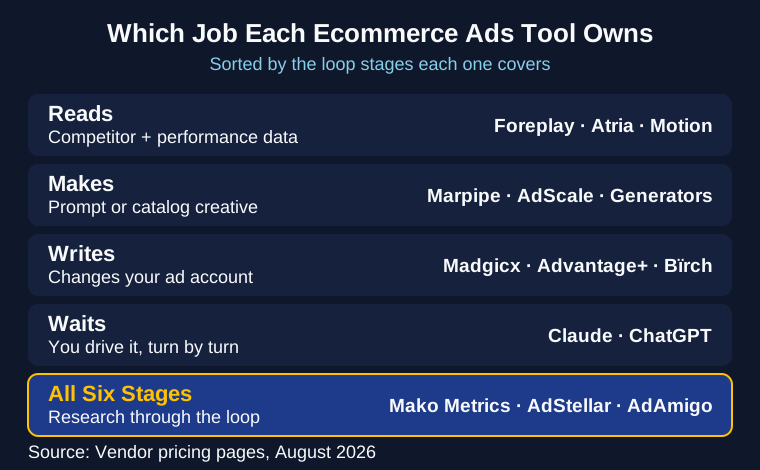
That question matters more for an ecommerce store than any feature list, and it splits the whole category. "Agent" hides four different jobs. One tool reads competitor ads. One makes creative from a prompt. One changes budgets in your account overnight. One waits for you to type. The homepage word tells you nothing about which of those you're buying, or whether the ad will feature your product or a stand-in.
Below are ten of them, sorted by the job each one owns, priced from every vendor's own page this month, and graded on the one thing an ecommerce buyer should check first: does it use your real products.
The short version
- "Agent" covers four different jobs. Tools that read competitor and performance data, tools that make creative, tools that write changes to your ad account, and chat tools you drive turn by turn. Decide which one you're buying before you compare prices.
- The ecommerce question no listicle answers: Does it put your real product in the ad, or a generic stand-in? That single test sorts the whole list.
- Only three of the ten span the whole loop. The rest own one station and own it well.
- Meta's catalog tools and Advantage+ Shopping are free and built in. Most of the paid tools sit on top of them.
- Pricing model beats sticker price. Some charge per ad account, some by your ad spend, some by your SKU count. What scales cheapest depends on your store.
The four things people mean by "Meta ads agent"
A Meta ads round has six stages. Research the category, pick angles, build the creative, screen it against brand and policy, assemble the campaign in the ad account, then read what happened and brief the next round. That's the loop, and I've written about how the loop actually runs in more depth.
Sort the ten products by which of those stages they own and they fall into four groups.
Tools that read. Foreplay and Atria watch competitor ads and hand you a brief. Motion sits here too, reading your own performance data to tell you which creative sold. They're strong at the front and back of the loop. Nothing they produce touches your ad account. The competitor tracking tools post covers this layer in depth.
Tools that make. This group splits two ways for an ecommerce store. Generators like AdCreative.ai, Arcads, and Creatify turn a prompt into a static, a video, or a UGC clip. The catalog specialists, Marpipe and AdScale, make ads straight from your product feed. One invents a concept; the other reuses your catalog photo. Both matter, and they solve different problems.
Tools that write. Madgicx, Bïrch, AdScale, and Meta's own Advantage+ change objects in your ad account: budgets, bids, audiences, product sets. They own the back half of the loop. Ryze is the cheap autonomous option in this group. Smartly.io is the enterprise ceiling, built for stores running catalogs in the thousands and spend well past what most of this list is priced for, so it stays a mention rather than a ranked slot.
Tools that wait. Claude and ChatGPT connected to your account through Meta's official connectors. They'll do any stage you ask, in the order you ask, and stop when you stop typing.
Three products cover most of the loop: Mako Metrics, AdStellar, and AdAmigo. The rest own a station or two, and a single store can usually skip the reads-only and rules-only tools (Atria, Bïrch) until it has a person to run them.
The mistake I see store owners make is buying a generator when the stall is that the ads never look like their product, or buying a reader when nobody is going to act on the brief. Both purchases feel productive. Neither ships a better round.
Meta ads agents compared
Ten products get sold as Meta ads software for ecommerce. Here they are side by side, every price taken from the vendor's own page in August 2026. The last column is the one the other roundups skip, and for a store it's the one that decides whether the ad works.
| Tool | Job | Best for | Starting price | Builds the campaign | Uses your real product |
|---|---|---|---|---|---|
| Mako Metrics | Whole loop | Stores that want the round built on their real products | $100/mo | Yes, delivered paused | Yes, from your uploads |
| AdAmigo.ai | Whole loop | Lean stores wanting daily autopilot | $99/mo per ad account | Yes | From your account assets |
| AdStellar | Whole loop | Self-serve creative to launch tonight | $100/mo | Yes | Prompt-driven, watch it |
| Madgicx | Writes | DTC running Meta as the main channel | Not published | No | Feed image |
| AdScale | Writes | Shopify-native automation off store data | From $169/mo | Yes | Feed image |
| Marpipe | Makes | Turning a big catalog into real-looking creative | $199/mo | No | Feed image |
| Motion | Reads | Knowing which creative actually sold | $750/mo | No | n/a |
| Foreplay | Reads | Swipe files and briefs from competitor ads | $59/mo | No | n/a |
| Meta Advantage+ Shopping | Writes | A free, catalog-native starting point | Free | Yes | Feed image |
| Claude or ChatGPT | Waits | Driving it yourself, turn by turn | Free in beta | Yes, if you ask | However you prompt it |
The 10 best Meta ads agents for ecommerce
1. Mako Metrics: Best for stores that want the round built on their real products
This is ours, so read the limitations below before you read anything else.
May, our Meta ads agent (May by Mako Metrics), runs the whole loop for your store's account. It reads what competitors in your category are running this week, turns that into angles with copy and image prompts you can edit, builds the creative from the product images and brand assets you upload, screens every asset against brand and Meta policy rules, and assembles the campaign in the ad account with tracking attached. It arrives paused. You turn it on.
The thing it does that most of this list can't: the ad shows your actual product. Upload your real cold-press can and the creative features that can, on your palette, with your type. Generators invent a plausible product that isn't yours. Catalog tools use your real feed image but wrap it in a template rather than a fresh concept. May gives you both at once, your real SKU inside a new idea, briefed by what's already working in your category. Writes to the account run through a proxy with a spend cap, so a creative nobody approved has no path to your budget.
Now the limits. It's Meta only, so Facebook and Instagram and nothing else. It's a service with a call to get started, not a dashboard you can buy a seat in tonight. Reading live results, changing budgets, and writing what worked into the next brief are run by a person against the same rules. We don't claim a ROAS or CPA advantage, because we don't have the data to. What we claim is better inputs: real products, competitor-briefed angles, screening, and a memory of what your brand ran last time.
When to buy something else
- You want to launch a test tonight. Buy AdStellar. It's $100, self-serve, no call. We can't match that trial friction and there's no point pretending otherwise.
- You have a huge catalog and need every SKU covered. Buy Marpipe or run Meta Advantage+ Shopping. Automating creative across thousands of products from the feed is their job, not ours.
- Your creative is fine and you can't tell which product sold. Buy Motion. That's a measurement problem, and we don't sell measurement.
Want to see the work before you talk to anyone? See May run a round from the competitor read to a paused campaign built on a real product, sitting in the account. No call, no form, and you can judge the creative before you book anything.
Pricing: $100/mo for a single store account, founding rate, with competitor reports included. The research layer sells on its own from $24.99 a report, which is the cheapest way to judge the quality of the read before you hire anyone to act on it. Both sit on the same pricing page, agent first. Source: Our pricing page, August 2026.
2. AdAmigo.ai: Best for lean stores wanting daily autopilot
AdAmigo is a conversational AI media buyer. It takes write access to your account, designs ads, and sends daily autopilot recommendations against your targets. The entry tier is aimed at stores spending under $2,000 a month, which is a lot of DTC brands finding their first winners.
Give it its due plainly: at $99 an account it automates more of the loop than we do. Its autopilot covers the ops stages we run by hand, so on "how much of my week does this remove," AdAmigo has the stronger answer, and I'll say so in those words.
The trade is review depth. AdAmigo markets that you approve everything, and the product is still built to recommend and act on the account every day. Our round arrives paused for you to turn on. Different stores should call that risk differently. If you want to understand what write access can get wrong, read this first.
Pricing: $99/mo per ad account for Entry, $349/mo per ad account for Unlimited Access. Source: AdAmigo pricing, August 2026.
3. AdStellar: Best for self-serve creative to launch tonight
AdStellar generates image, video, and UGC ads, pushes campaigns to Meta, and syncs performance hourly. One self-serve plan, a free trial, no annual contract, no per-seat fees. It's the fastest way onto this list to have something running tonight.
The limitation is two-part. Credits run out: video and UGC burn about 2,800 each against a 50,000 monthly balance, so heavy video output hits the ceiling fast. And the creative is prompt-driven, so watch that the creative looks like your product before you spend behind it.
Pricing: $100/mo Team, 50,000 credits. Source: AdStellar pricing, August 2026.
4. Madgicx: Best for DTC running Meta as the main channel
Madgicx calls itself the "first Ecom Ad Cloud," and for a store that lives inside Meta it's the deepest specialist here. Automation, audience targeting, creative insights, server-side tracking, and direct Shopify and Klaviyo connections all sit on one platform aimed squarely at DTC.
The limitation is the finding: no public price. The pricing page shows $0/mo and hides the real number behind a monthly-spend bracket you pick inside the app. You can't budget your store against a figure you can't see without signing up.
Pricing: Not published; the Tracking Pro add-on is $49/mo. Source: Madgicx pricing, August 2026.
5. AdScale: Best for Shopify-native automation off your store data
AdScale connects straight to Shopify, BigCommerce, Wix, or WooCommerce, builds product-specific ads, and adjusts targeting off your real-time store performance across Meta and Google. For a store with no media buyer that wants the feed-to-ad workflow handled, that store-data connection is the draw.
The limitation is depth. Running Meta and Google together means less Meta-specific optimization than Madgicx, and the ads use your catalog feed image rather than a fresh concept built on the product.
Pricing: From $169/mo for the self-serve AdScale plan (Plus/Pro are managed and start much higher), with a 14-day trial. Source: AdScale pricing, August 2026.
6. Marpipe: Best for turning a big catalog into real-looking creative
Marpipe is the catalog specialist. Its pitch is to "make your catalog ads look like real ad creative," adding design treatments and video on top of your product feed, plus feed management and product-level filtering that pulls weak SKUs out of a campaign. Marpipe reports around a 20% lift on catalog ads. If you have hundreds or thousands of products, this is how you dress all of them at once.
The limitation is scope. Marpipe enhances the feed image; it won't research a competitor or build a net-new concept off-catalog, and enterprise pricing climbs quickly as your SKU count grows.
Pricing: Feed Management free, Startup $199/mo up to 500 SKUs, Enterprise from $999/mo. Source: Marpipe pricing, August 2026.
7. Motion: Best for knowing which creative actually sold
Motion connects creative elements to performance and gives you an ad leaderboard and visual reports, so you can see which hook, format, and product drove the result. Unlimited seats and unlimited ad accounts even on the entry plan.
The limitation is the price. It's $750/mo before you've made a single ad, and it reads results rather than producing the next round. One note that saves confusion: this is motionapp.com. The similarly named usemotion.com is a calendar app.
Pricing: Starter $750/mo up to $50k monthly spend, Pro $1,050/mo. Source: Motion pricing, August 2026.
8. Foreplay: Best for swipe files and briefs from competitor ads
Foreplay keeps a permanent archive of competitor ads, including ones the competitor later deleted, plus Spyder brand monitoring, a brief builder, and its Lens analysis. For a store building its own creative, it's the reads layer that feeds the shoot.
The limitation is where it stops. Foreplay is research and workflow; it hands you a brief and nothing reaches the ad account. If you're weighing it against us specifically, here's the head-to-head.
Pricing: Basic $59/mo, Workflow $175/mo, Agency $459/mo. Annual billing runs $49 / $149 / $389. Source: Foreplay pricing, August 2026.
9. Meta Advantage+ Shopping: Best free, catalog-native starting point
Advantage+ Shopping is the floor every paid tool on this list sits on top of. The campaign pulls straight from your product catalog and lets Meta's AI handle targeting, placement, and budget split across your products. It's built in and it's free.
The limitation is that it optimizes inside a catalog and campaign structure you've already set up. It won't research a competitor, build an on-brand concept, or tell you what changed week to week. It runs your catalog well and stops there.
Pricing: Free, built into Meta. Source: Meta Business Help, August 2026.
10. Claude or ChatGPT via Meta's Ads AI Connectors: Best for driving it yourself
Meta opened an official connector at mcp.facebook.com/ads in open beta on 29 April 2026. Point Claude or ChatGPT at it and you get 29 tools across reporting, campaign management, catalog operations, and diagnostics. Both assistants confirm before any write, and connecting takes about 15 minutes with no developer credentials. For a hands-on owner, it's the cheapest way to put an assistant on the account. If you'd rather understand how to build one of these, start here.
The limitation is that you're the operator. There's no memory across sessions, so every run starts from a cold context, and the quality of the read comes down to the quality of your prompt.
Pricing: Free during the open beta; your cost is the LLM subscription. Source: Meta Ads AI Connectors announcement, April 2026 (open beta), confirmed August 2026.
Does it use your real products, or a generic stand-in?
Here's the section I'd read first if I ran a store. For an ecommerce brand, the creative question that decides whether an ad works is simple: which product image ends up in it? The tools answer that in three different ways.
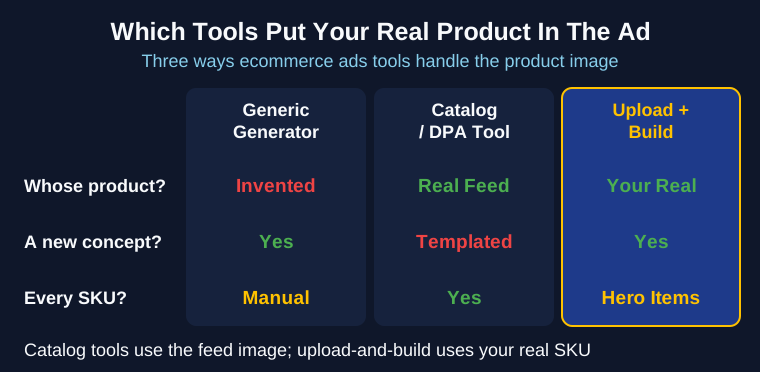
Generic generators invent the product. Ask a pure text-to-image tool for a cold-press coffee ad and you get a can, styled and lit and completely fictional. That's fine for a lifestyle background or a texture. It's wrong for the hero shot, because the thing a shopper is supposed to recognize and buy is a can you don't sell.
Catalog and DPA tools use your real feed image. Marpipe, AdScale, and Meta's Advantage+ Shopping pull the actual product photo from your catalog, so the product is correct. What they can't do is build a fresh concept around it. You get your real catalog photo dropped into a template, at scale, across every SKU. Right product, borrowed idea.
Upload-and-build uses your real product in a new concept. You hand over your real product images and brand assets, and the creative is a new idea built on the actual SKU. This is what May does, and it's the gap between the first two options: your real can, in a concept that wasn't a template. You can see the same pattern in the long-running winners we've studied, where the ads that ran longest put the real product front and center rather than a stock stand-in.
The reason this matters is volume against SKU count. A store with 300 products can't shoot a fresh concept for each one, and it doesn't need to. Catalog tools solve breadth: every SKU gets covered with its feed image. Concept tools solve depth: your hero products get real ideas built on the real item. The trap is buying breadth when your problem is depth, or paying for concept work across a catalog that just needs to be dressed. Name which problem you actually have before you pay for either.
What this costs for one store
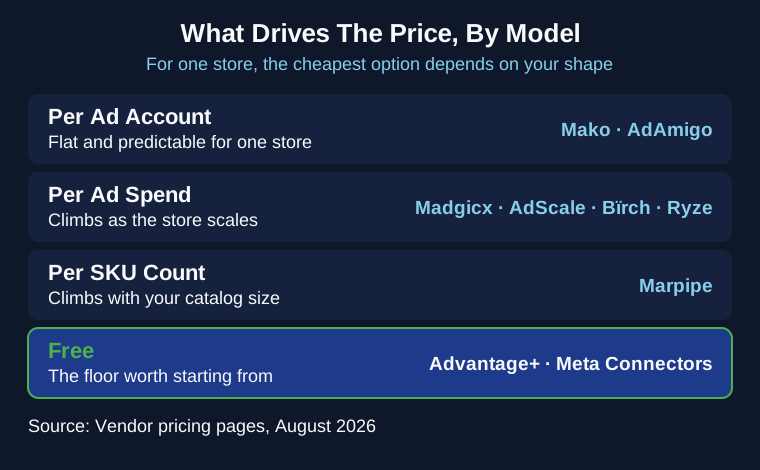
Sticker price is the wrong thing to compare, because these tools charge on four different axes, and for a single store they sort very differently than they would for an agency roster.
Per ad account. Mako at $100 and AdAmigo at $99 charge for the account. For one store that's the simplest number to budget: flat, predictable, the same next month. This is our model, and for a single store it's the easy one to plan around, which I'll happily say because on a big agency roster the same per-account model is the one that scales worst. The ladder looks different again if you sell software, where an audience-matching layer can cost more than every creative tool combined: see the B2B software comparison.
Per ad spend. Madgicx, Bïrch, and Ryze price against how much you spend. Cheap while you're small, and the bill climbs as the store scales, so budget for the version of you that's spending more. AdScale is a hybrid: a flat monthly subscription plus usage that rises with spend tiers.
Per SKU count. Marpipe charges by catalog size: $199 up to 500 products, then higher tiers past that. A big catalog is exactly where its value is, and exactly where its price is too.
Credits, and free. AdStellar rises with output volume against its credit balance. Advantage+ Shopping and Meta's connectors cost nothing, and that's the floor worth starting from: for a store spending under a few thousand a month, the free Meta tools plus a careful hand may be all you need before you pay for anything.
So the fair read is that the cheapest option depends on where your store is. A low-spend store leans on the free Meta tools. A scaling store watches the spend-tiered bills. A big catalog pays Marpipe or nobody. What $100 buys with us is a competitor read, a round of creative built on your real products, and a campaign assembled and handed back paused at $0 spent, with about $0.08 of image generation per usable asset. Put that next to what a round costs you today, in hours or in freelancer invoices, and the comparison is yours to run rather than mine to assert.
How to choose, by store shape
The right tool depends on your store's shape more than its size. Six common situations, each with a pick.
- Low-SKU hero product, creative is the bottleneck. Go with the loop tools, Mako or AdStellar. Your win is a fresh concept built on your real product, not a template.
- High-SKU catalog, you need every product covered. Marpipe or Advantage+ Shopping. Catalog scale is the job, and dressing the feed is what they do.
- Shopify store, no media buyer, you want it automated end to end. AdScale or AdAmigo. Both automate the account for you, and AdScale works straight off your store data.
- You live in Meta and want the deepest optimization. Madgicx, if you're comfortable requesting the price.
- Creative is fine, you can't tell which product sold. Motion. That's a measurement gap, and measurement is what it does.
- Budget is zero and you want to test the idea this week. Advantage+ Shopping, or Claude and ChatGPT on Meta's connectors. Both cost nothing to try.
FAQ
What is the best AI tool for ecommerce Meta ads? It depends which job you're buying. For the whole round built on your real products, that's the loop tools like May, AdStellar, or AdAmigo. For catalog coverage across many SKUs, Marpipe or Advantage+ Shopping. For reading what worked, Motion. Advantage+ Shopping is the free floor everyone should start from.
How much does a Meta ads AI tool cost? Anywhere from free to $1,050 a month. Meta's own Advantage+ Shopping and its Claude and ChatGPT connectors are free. Paid tools run from about $49 to $750 for an entry tier. Two vendors, Madgicx and Smartly.io, don't publish a price at all, so you'll have to sign up or book a call to see it.
Does Meta have its own AI for ecommerce ads? Yes, two of them. Advantage+ Shopping pulls straight from your product catalog and lets Meta's AI handle targeting and placement. Separately, the Ads AI Connectors let Claude or ChatGPT drive your account through an official Meta server, in open beta since April 2026.
Which tool actually uses my real products in the ad? Catalog and DPA tools (Marpipe, AdScale, Advantage+ Shopping) use your real feed image but keep it in a template. Generic generators invent a stand-in product. Upload-and-build tools like May put your real SKU inside a new concept. That last one is the answer most listicles skip.
Will an AI agent blow my ad budget? It can, if it has unguarded write access to a live account. The controls that keep it safe are a write proxy, a hard spend cap, delivery that stays paused until you approve it, and a log of every change. We cover what goes wrong, and how to check for these, in the guardrails post.
Is Motion the same as usemotion.com? No. Two companies, one name. motionapp.com is creative analytics for paid social; usemotion.com is an AI calendar and project manager. If you're shopping for the ad tool, it's motionapp.com.
Which one to actually buy
The category's shared flaw is that "agent" hides the job. Before you compare prices, decide which of the four you're buying, and match it to the station in your loop that's actually stalling.
For an ecommerce store, add the tiebreaker no other roundup uses: does it put your real product in the ad. Catalog tools give you every SKU with its feed image. Concept tools give your hero products a real idea built on the real item. Breadth or depth is the real purchase decision.
If the stall is that your ads never quite look like your brand, that's the whole round, and it's what May was built to hand back. Generate a round on your real product and see what comes out before you decide. Seven concepts, five finished creatives, no call, no card.