
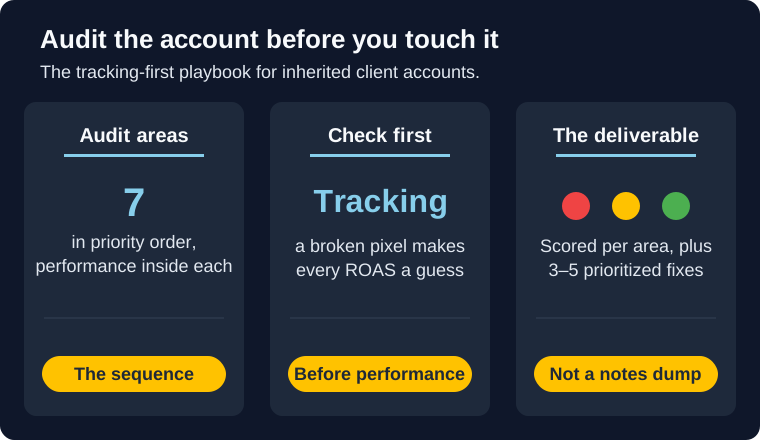
You just got Business Manager access to a new client's Meta ads account. The previous agency is gone, the handoff doc is a paragraph, and the client wants a plan by Friday. The reflex is to open Ads Manager and start fixing things: pause the losers, bump budget on the winners, ship some fresh creative.
Don't. You're about to optimize against numbers you haven't verified, in an account you haven't read. A proper Meta ads account audit comes first, and the order you run it in decides whether the audit is worth anything. Check tracking before performance, because a broken pixel makes every ROAS number in that account a guess. This post gives you the seven areas to audit, in the sequence that actually de-risks the account, plus how to package the result as a scored deliverable the client can act on instead of a wall of notes.
Bottom line
- Audit before you optimize. Tuning an inherited account before reading it is guessing with the client's budget.
- Order matters: tracking first. If conversion tracking is broken, every performance number below it is unreliable. Fix the measurement before you judge the results.
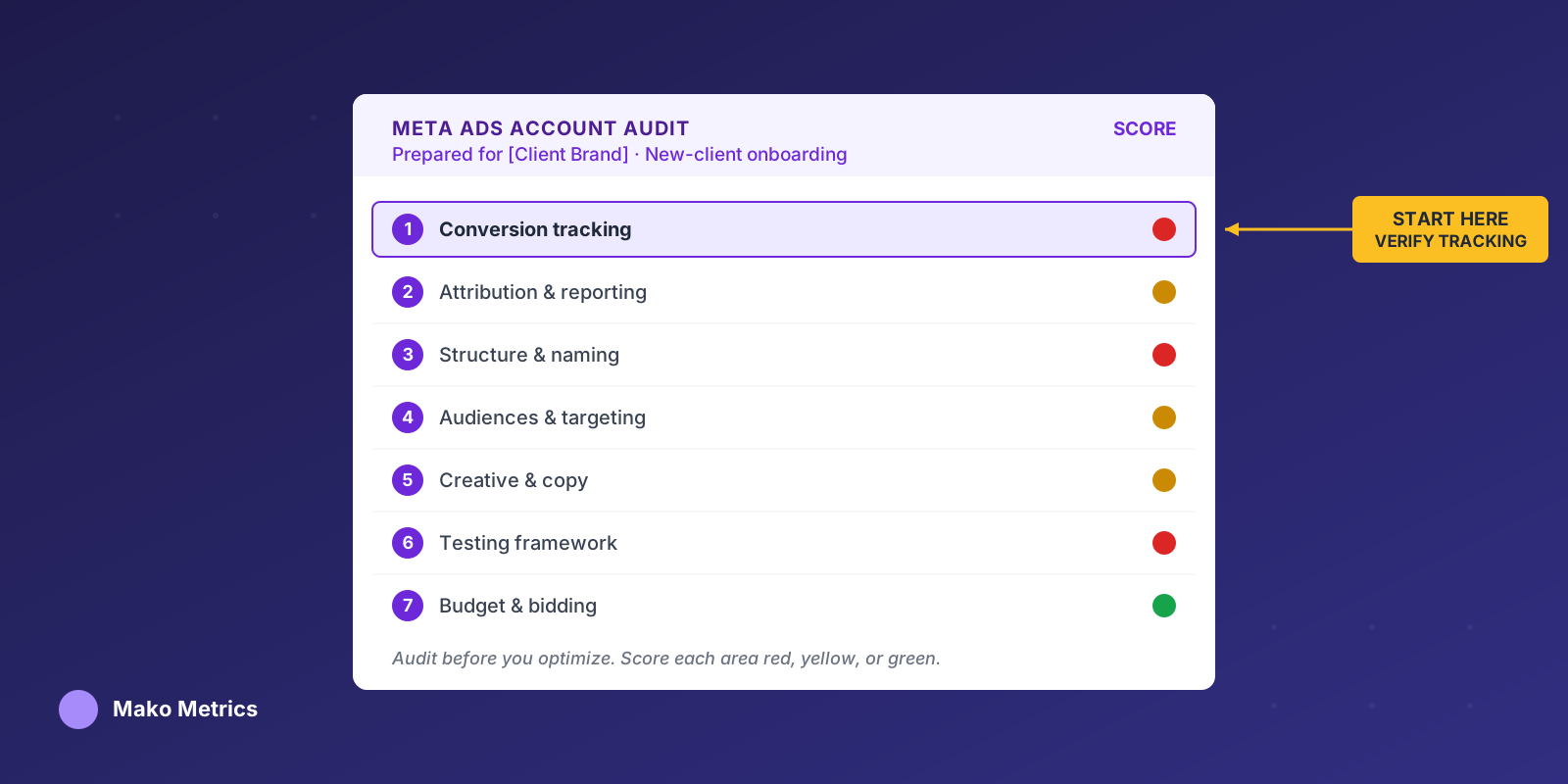
- Seven areas: conversion tracking, attribution and reporting, account structure and naming, audiences and targeting, creative and copy, testing framework, and budget and bidding.
- Performance lives inside each area, not in a separate section. Each area carries its own metric read.
- Ship a scorecard, not a notes dump. Red, yellow, or green per area, plus three to five prioritized fixes.
- The blind spot: an account audit only looks inward. You can't see what competitors are doing from inside Ads Manager.
Why onboarding is the wrong time to optimize first
The first 90 days with a new client are the trust window. The client is watching to see whether hiring you was a good decision, and the fastest way to lose that bet is to make a confident change that blows up because you misread the account.
So treat the audit as the first real deliverable, not unpaid prep you rush through before the "real" work. Run the full audit immediately on onboarding, before any optimization, and most account-hygiene guides agree on that sequencing for a reason: you need a baseline before you touch anything. The NoFluff account hygiene checklist frames it as a full audit on day one, then weekly hygiene checks and a quarterly deep audit after that. That cadence is the right shape.
There's a second reason the audit pays for itself: it gives you a documented before-and-after. When you show up in month three with "here's the account we inherited, here's what we fixed, here's the result," the scorecard you build now becomes the proof. This audit is the inward half of the picture. The competitive audit you can productize and bill for is the outward half, and that post deliberately leaves account audits out of scope. This is the companion that covers them.
Step zero: get clean access before you judge anything
Before any analysis, get proper access through Business Manager: ad account at the right permission level, Page, pixel or dataset, and catalog if they run dynamic ads. While you're in there, audit the user list. Apply least privilege, grant only what each person actually needs, and flag inactive users and the departed agency's lingering access for removal. It's a two-minute check that occasionally surfaces a security problem the client didn't know they had.
The seven audit areas, in priority order
Most Facebook ads account audit checklists you'll find online list 25 or 38 points in no particular order. That's a to-do list, not an audit. The value is the order you work it in and the judgment you apply at each step.
Work the account in the sequence below. The logic is simple: fix the things that corrupt your data before you trust the data. Tracking comes first because a misfiring pixel poisons every performance metric downstream. Attribution comes second because it determines what the numbers even mean. Only then do structure, audiences, creative, testing, and budget make sense to evaluate.
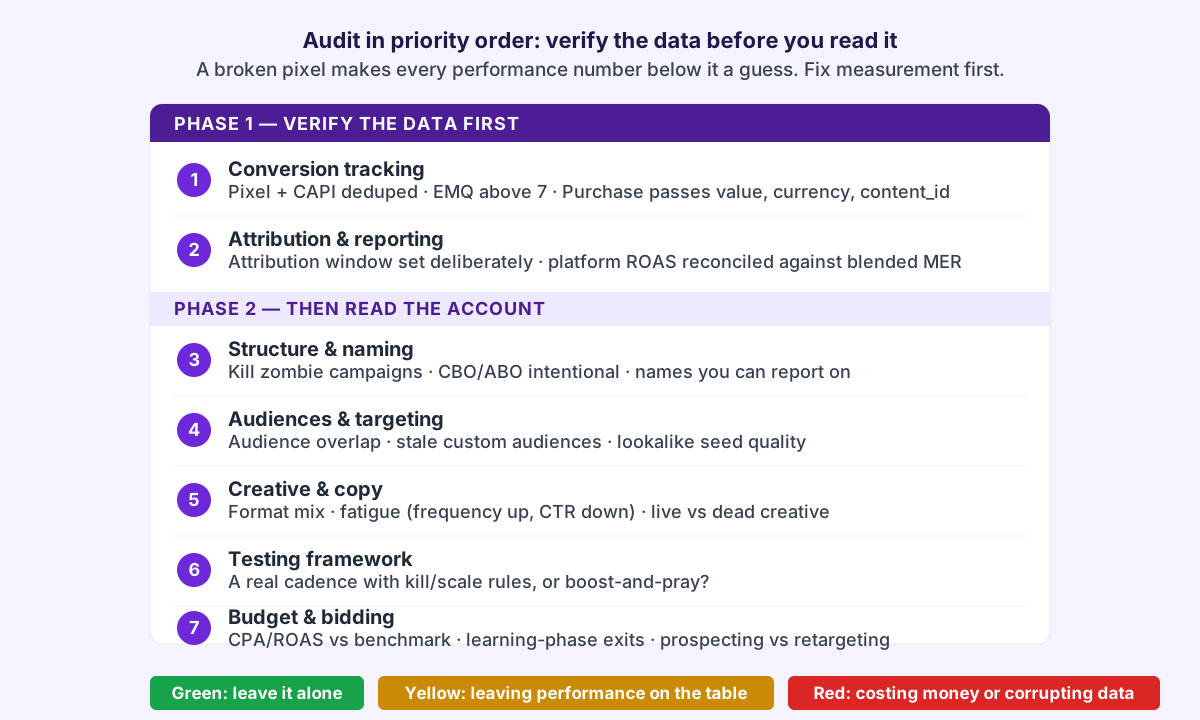
You're not just checking boxes. For each area, you're scoring it red, yellow, or green and noting the one or two things that would move it. That scoring is what becomes the deliverable later.
Area 1: Conversion tracking and measurement (audit this first)
Start in Events Manager, not Ads Manager. If conversion tracking is broken, everything you'd read in the performance tab is fiction, and you have no business optimizing toward it.
Check these in order:
- Pixel and Conversions API are both live and deduplicated. Browser-only tracking has been bleeding signal since iOS 14. If the account is running the pixel alone with no server-side events, that's a finding on its own. If both are firing but not deduplicated, conversions are being double-counted. Our Meta Conversions API setup guide covers the dedup logic and the
event_idmatch. - Core standard events fire once per action. ViewContent, AddToCart, InitiateCheckout, Lead, and Purchase should each fire a single time at the right moment. Walk the site with the Meta Pixel Helper and the Test Events tool to confirm. A correctly installed pixel is the floor, not the finish line.
- Purchase passes value, currency, and content IDs. Without value and currency, Meta can't optimize for revenue and your ROAS column is decorative. A Purchase event firing with no value is one of the most common and most expensive misconfigurations in inherited accounts.
- Event Match Quality is above 7. Low EMQ means weak signal matching and worse delivery. Check it per event in Events Manager and note anything sitting in the 5-to-6 range as a fixable yellow.
The performance read here is binary. Tracking is either trustworthy or it isn't. If it isn't, this becomes fix number one on the deliverable, and you hold off on performance judgments until it's clean.
Area 2: Attribution and reporting
Now that you know whether the data can be trusted, figure out what it's actually measuring. Two accounts with identical "4x ROAS" can be telling completely different stories depending on attribution settings.
Check the attribution window. The current default is 7-day click and 1-day view, and plenty of accounts are running it without anyone having chosen it deliberately. A 7-day-click ROAS looks healthier than a 1-day-click ROAS for the same spend, so know which one the previous agency was reporting before you compare anything to it.
Then reconcile platform-reported numbers against reality. Since iOS 14, Meta under-reports some conversions and models others, so the in-platform ROAS is an estimate, not a receipt. The way to sanity-check it is to compare platform ROAS against blended performance: total revenue over total ad spend. If you're new to that reconciliation, MER versus ROAS walks through why the blended view is the one that survives contact with the P&L, and our breakdown of iOS attribution for ecommerce explains where the reported-versus-actual gap comes from. A great-looking platform ROAS sitting on top of a thin blended return is a yellow you want to catch before the client does.
Area 3: Account structure and naming
Structure you can't read is structure you can't optimize or report on. Open the campaign view and look for the shape of the account, not just the numbers.
Flag the usual inherited mess: campaign and ad set sprawl with no clear logic, a random mix of CBO and ABO with no apparent reason, and zombie campaigns still switched on and spending. Killing a dead campaign that's been burning a few dollars a day is a clean quick win you can point to in week one.
Check whether Advantage+ Shopping campaigns are in use and whether that's intentional or default drift. Then look at naming. If you can't tell what a campaign targets from its name, you can't build reporting on it, and neither could the last team. Consistent naming is the thing that makes every later report legible to the client.
Area 4: Audiences and targeting
Inherited targeting tends to accumulate cruft. Look for four things.
Audience overlap is the expensive one. When multiple ad sets target overlapping audiences, the account bids against itself and inflates its own CPMs. Stale custom audiences are the quiet one: expired retargeting windows and customer lists with tiny match rates that are starving the funnel without anyone noticing. Then assess the broad-versus-interest balance and whether it matches the account's spend level, and check lookalike hygiene, including how good the seed audiences actually are. A lookalike built off a 200-person seed list isn't doing what the previous team thought it was.
Area 5: Creative and copy
This is the part clients assume the audit is about, and it matters, but read it through a performance lens rather than an aesthetic one.
Look at the format mix across static, video, carousel, and reels, and whether the account is over-indexed on one format by default rather than by evidence. Check creative fatigue directly: rising frequency paired with falling click-through rate is the signature of ads the previous team kept running past their expiration. Our creative fatigue detection playbook has the frequency and spend-band thresholds for calling it. Then count live versus dead creative. A lot of inherited accounts have ten ads in an ad set with two doing all the work and eight dragging down the average. Note angle diversity too. If every ad runs the same hook, the account has no creative range to fall back on when the current winner fatigues.
Area 6: Testing framework
This is where inherited accounts are emptiest, and it's the area most checklists skip entirely.
You're looking for evidence of a system, not a pile of past activity. Was there a real testing cadence with kill and scale rules, or was it boost-and-pray? Clean A/B tests with documented winners tell you the previous team had a process you can build on. Random one-off launches with no through-line tell you the past wins were luck, and luck doesn't carry forward. Be honest in the scoring here, because a client who thinks their account has a testing engine when it doesn't will misread every result for the next quarter. If there's no testing framework, score it as a structural gap you'll need to build from scratch, and say so plainly in the deliverable.
Area 7: Budget, bidding, and flighting
Now that tracking and attribution are verified, the spend data is finally worth reading.
Benchmark the account's CPA and ROAS against category norms so you can tell the client where they stand rather than just reporting raw figures. Our Facebook ads cost benchmarks and ROAS benchmarks give you the yardstick. Check for ad sets stuck in the learning phase, which usually points to budgets fragmented across too many ad sets to ever exit learning. Look at the prospecting-versus-retargeting split and whether it matches a real funnel; a full-funnel structure is what you're comparing against. If the account uses dayparting or flighting, confirm it's backed by a real conversion-time pattern and not a setting someone copied from a different client. If the account is clearly underperforming its benchmark, our guide to why Facebook ads stop converting maps the usual culprits, most of which you'll have already caught in the areas above.
Turn the audit into a client deliverable
Notes in a Google Doc aren't a deliverable. The same analysis becomes worth paying for when you package it as something the client can read in two minutes and act on.
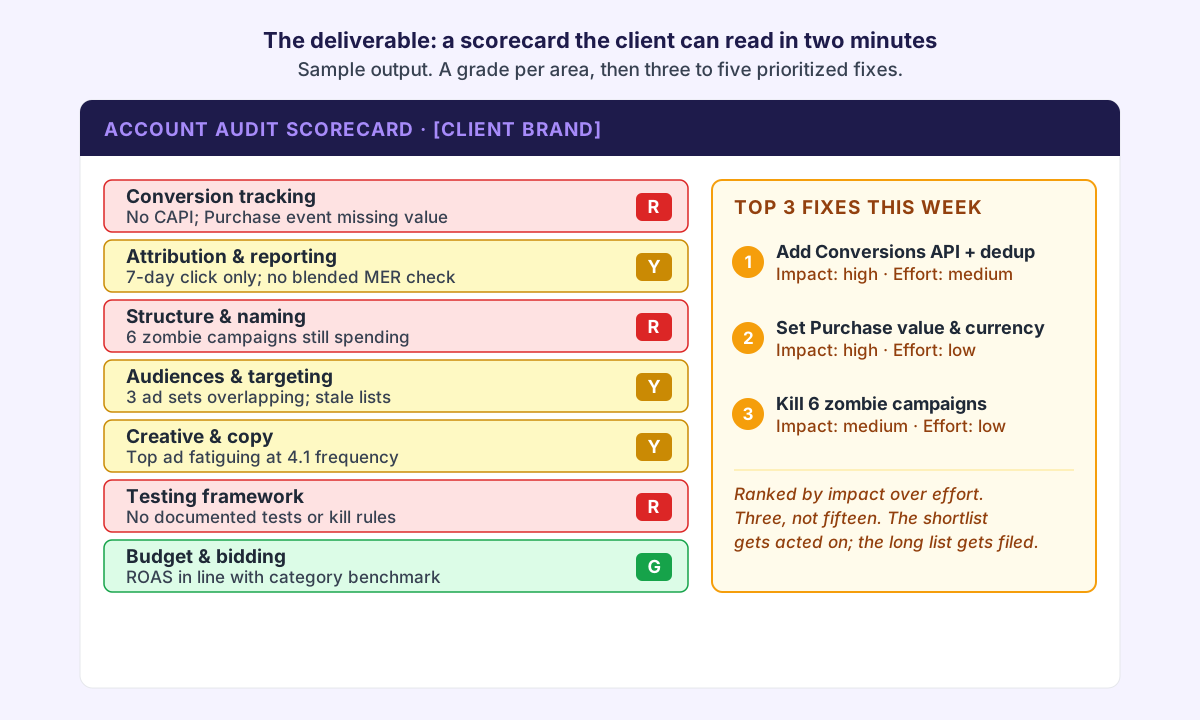
Score each of the seven areas red, yellow, or green. Red means it's actively costing money or corrupting data and needs a fix now. Yellow means it works but is leaving performance on the table. Green means leave it alone. That color grid is the whole audit at a glance, and it gives the client an honest baseline to measure your work against later.
Under the grid, list three to five prioritized fixes, ranked by impact against effort, each tied to the area it came from. Not fifteen. The discipline of choosing the top few is exactly the judgment the client is paying for, and a focused shortlist gets acted on while a comprehensive list gets filed. This mirrors the structure of a productized competitive audit, which also covers how to price this kind of work if you want to bill it as a standalone line item rather than fold it into onboarding.
The blind spot: an audit only looks inward
Here's the limit of everything above. Every one of those seven areas looks inside the client's account. You can run a flawless account audit and still miss the most important thing happening to the client: what their competitors are doing.
You can't see a competitor's testing velocity, their offer architecture, or the angles they're scaling from inside Ads Manager. So the account audit tells the client how their own engine is running, but not whether the rest of the field just shifted into a higher gear. Pairing the inward audit with an outward one is what turns "here's what's wrong with your account" into "here's where you stand in your market."
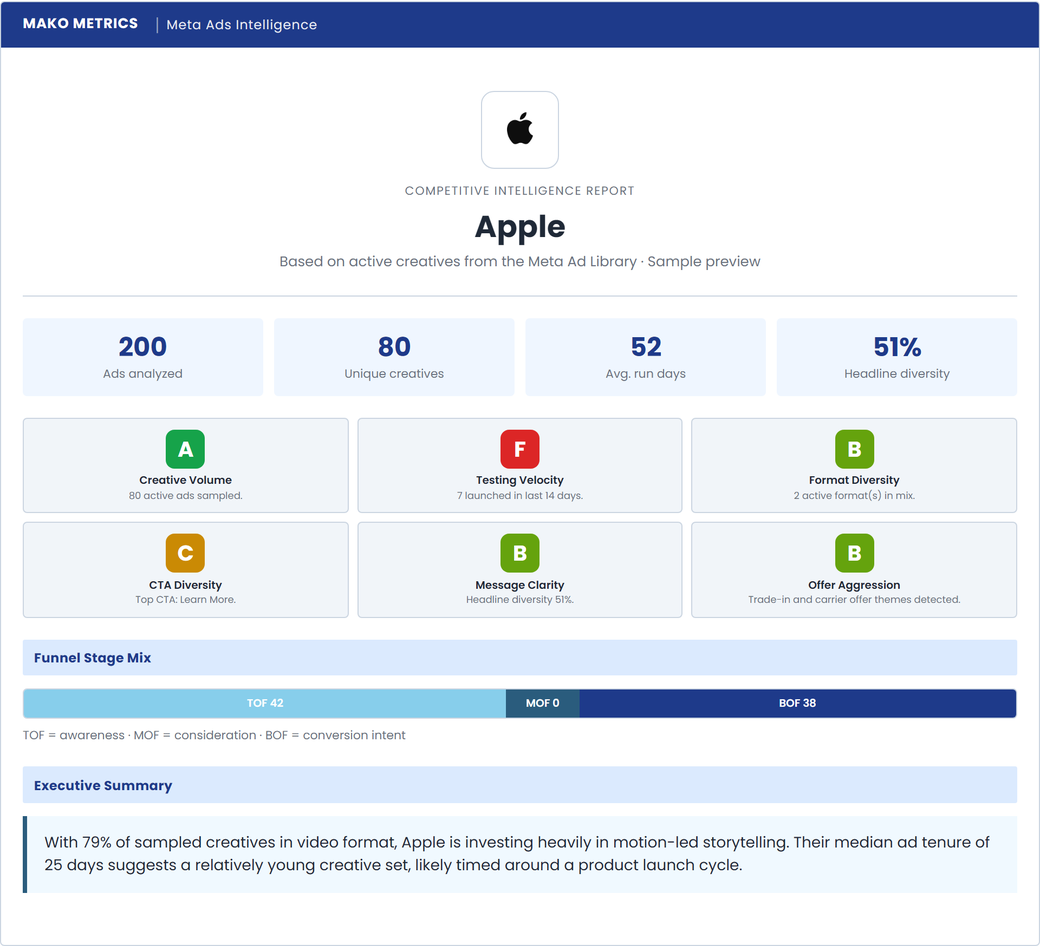
The outward half of the picture: a Mako Metrics competitor report on Apple. The same scorecard logic you just applied to the account, pointed at the competition.
Audit one competitor while you audit the account
While you're working through the seven areas, browse the Mako Metrics sample reports to see the format: a competitor's active ads, formats, and creative angles, no login required. Then order a Snapshot for your client's actual competitor to add the outward half of the picture to your onboarding deliverable.
Mistakes that make an audit useless
Four mistakes turn an audit into wasted hours.
Optimizing before fixing tracking. If you bump budgets based on a ROAS column fed by a broken pixel, you're scaling noise. Tracking first, every time.
Shipping a flat point dump. A 38-item checklist with no priorities hands the client your homework instead of your judgment. The score and the shortlist are the product.
Trashing the previous agency. It's tempting to make the inherited mess look as bad as possible. Resist it. Document problems factually, take credit for the fixes, and don't torch the client's earlier decision to hire someone else. It reads as insecurity and it ages badly when your own work gets audited next.
Treating the audit as free prep. This is billable work that produces a durable artifact. Frame it as a deliverable with a baseline the client can hold you to, not a chore you do quietly before the engagement "starts."
What to remember
- Audit before you optimize. Touching an inherited account before reading it is guessing with someone else's budget.
- Run the seven areas in order, tracking first, because broken measurement makes every downstream number unreliable.
- Read performance inside each area rather than as a separate section, so every finding ties to a cause.
- Ship a scorecard: red, yellow, or green per area, plus three to five prioritized fixes ranked by impact over effort.
- Remember the blind spot. An account audit only looks inward; pair it with a competitor audit for the full picture.