
The QBR is on Thursday. The client is going to ask why you refreshed creative this week. You either have a real answer, or you have one you've rehearsed enough that it sounds real. Most meta ads creative fatigue advice was written for accounts spending $10k a day, and if you apply that cadence to a client paying you to manage $3k a month, you're going to refresh too often, kill learning phases, and watch CPA wobble for reasons you can't explain when leadership asks.
This is the playbook for the other accounts. The ones running $1k to $10k a month, on Ads Manager, without a Motion or Triple Whale stack, where you have to tell a client at the QBR exactly why you pulled the creative they paid for two weeks ago. The thresholds below are the ones I'd defend to a client. The 14-day diagnostic is the one I'd run on day one of any new account.
Bottom line
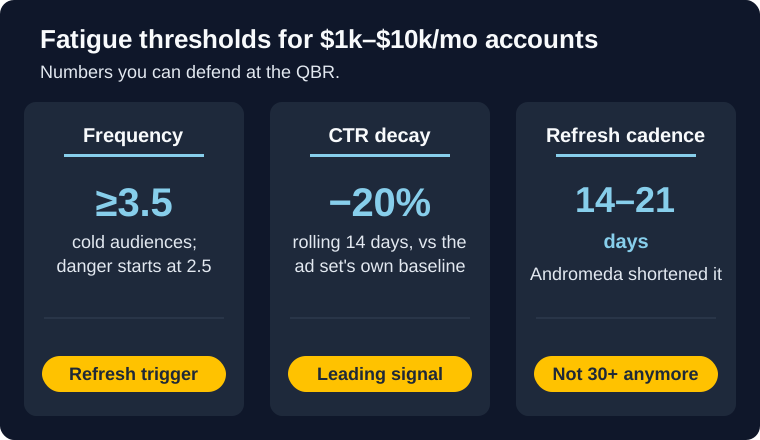
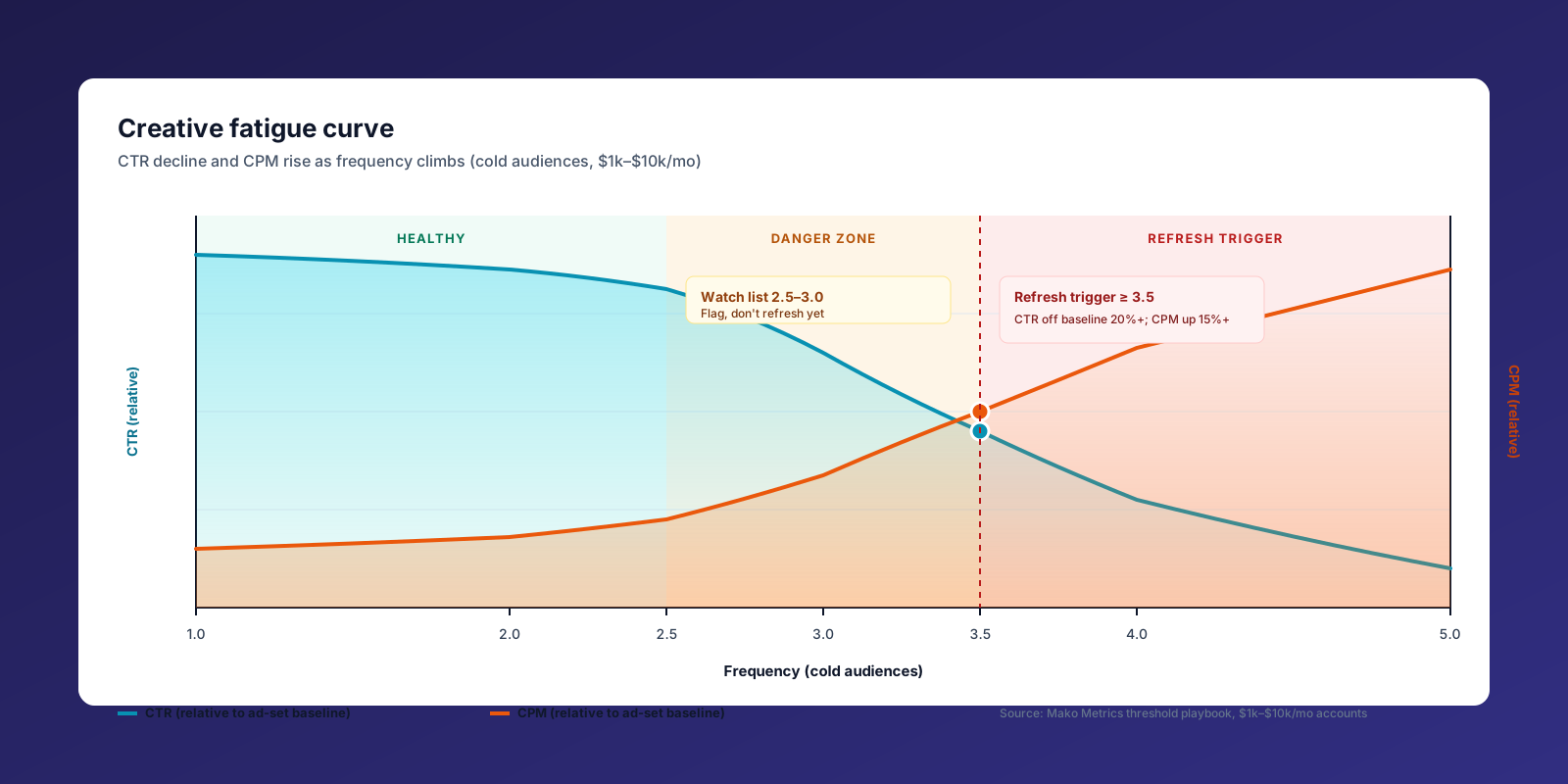
- Frequency danger zone (cold audiences): 2.5–3.0. Refresh trigger: ≥3.5.
- CTR decay trigger: 20%+ drop over rolling 14 days vs the ad-set's own baseline.
- At $1–3k/mo, CPA-decay is too noisy to trigger refreshes. Use it to confirm, never to lead.
- Andromeda compressed the cycle. Plan for refresh slots every 14–21 days, not 30+.
What fatigue actually looks like at small spend
Two things get smashed together under "fatigue." Ad fatigue is when an audience has seen you too many times and stops engaging. Creative fatigue is when the asset itself wears out, regardless of audience. If you want the longer general primer, the 7 signs of Facebook ads creative fatigue post covers the diagnostic basics. This post assumes you already know what fatigue is and need a defensible cadence at small spend. At enterprise budgets, you can usually tell which is which. At $3k a month, you can't, and it almost doesn't matter, because the fix is the same: rotate the creative.
The harder problem at small spend is statistical. Most of the cadence advice you'll find online points to top brands rotating creative every 10.4 days and producing 5 to 15 new creatives a week at $5k+ daily spend. Socium Media and Motion both publish versions of this. That's accurate guidance for the accounts they're describing, and it's bad guidance for the account you're managing. At $1–3k a month, you're not getting a clean weekly read on cost per purchase. The conversion volume isn't there. By the time CPA drift is statistically obvious, you've burned a week of spend and the client has already noticed.
So the playbook flips. You lead with leading indicators, the ones that move first and are noisy enough to read at small volume. CPA drift gets demoted to a confirmation signal. If that sounds like a small change, it isn't. Most fatigue posts implicitly tell you to watch CPA. Stop. At your spend band, CPA is a receipt, not a trigger.
The signal stack, in order of reliability
There are four signals worth watching. At $1–10k/mo, they rank in this order of trustworthiness: frequency, CTR decay, CPM rise, CPA drift. Watch them in that order. Trigger refreshes when two of the upstream three trip together. CPA confirms the call after the fact.
Frequency (cold audiences)
Frequency is the leading indicator everyone underweights. On cold audiences, the danger zone starts around 2.5 and clears 3.0 quickly. By the time a cold-audience ad is at frequency 3.5, you're paying impressions for a creative that's already losing engagement, and you'll see it in CTR a week later. AdStellar's read on the 3.0+ threshold lines up with what most agencies see in practice.
The Advantage+ caveat: ad-set-level frequency in Advantage+ Shopping campaigns can hide what's happening at the ad level. Always pull frequency at the ad level, not the campaign level, when you're checking fatigue. Otherwise you're averaging a fatigued ad with a fresh one and the number lies to you.
CTR decay
CTR decay is where fatigue actually shows up to the auction. The rule I use: 20%+ drop over a rolling 14 days, measured against the ad-set's own baseline, not a published benchmark. Young Urban Project's 2026 ad fatigue guide uses the same number, and it holds up at small spend better than week-over-week reads, which get destroyed by weekend noise.
The rolling part matters. Week-over-week comparisons on a $3k/mo account will fire false positives every Monday after a slow Sunday. Rolling 14 smooths it.
CPM rise
CPM rise is a second-order signal. 15%+ over 14 days is the threshold I'd flag, but only if your audience size held steady. If the audience grew, CPM rise is auction pressure, not fatigue. If the audience didn't change and CPM crept up, the creative is losing relevance and Meta is charging you more to deliver it. Treat CPM as a confirmation that pairs with the first two, not a standalone trigger.
CPA drift
This is the one most fatigue advice leads with, and it's the one that fails first at small spend. Below $3k/mo, your CPA reads are noisy enough that a 30% week-over-week swing can be a couple of attribution windows or a checkout flow burp. By the time you have a statistically clean fatigue signal in CPA, the upstream signals fired a week ago. Use CPA to confirm. Don't use it to decide.
Thresholds by spend band
Refresh cadence and signal sensitivity both shift with spend. Below is a starting-point table for the three bands inside our window. These are floors and ceilings, not commandments. Calibrate against each account's own baseline after the first 30 days.
| Spend / month | Frequency trigger (cold) | CTR decay window | CPM rise window | Refresh cadence | Statistical caveat |
|---|---|---|---|---|---|
| $1k–$3k | ≥3.0 | 20%+ over rolling 14 days | 15%+ over 14 days | Every 18–28 days, max 1 refresh per ad set per cycle | CPA reads are unreliable; lead exclusively with frequency + CTR |
| $3k–$6k | ≥3.3 | 20%+ over rolling 14 days | 15%+ over 14 days | Every 14–21 days | CPA reads start to stabilize; use as confirmation only |
| $6k–$10k | ≥3.5 | 20%+ over rolling 10–14 days | 15%+ over 10 days | Every 10–18 days | CPA decay becomes readable but still lags upstream signals |
Two notes. The frequency trigger climbs slightly with spend because higher-budget accounts can tolerate more impressions before the CTR cost gets prohibitive. The refresh cadence floor matters more than the ceiling: refreshing too often at $1–3k/mo destroys learning phases and produces the exact CPA wobble that gets agencies fired.
The 2026 reset: Andromeda shortened your calendar
If your refresh cadence still assumes a 4-to-6-week cycle, you're behind. Meta's Andromeda algorithm rollout in early 2026 compressed the practical fatigue window to roughly 2 to 3 weeks for most cold-audience creative on ecommerce accounts. Marketing Brew's coverage of the April 2026 marketer pushback on Meta's AI creative tools gets at the broader context: Meta is delivering creative faster, learning faster, and burning it faster.
The thresholds in the table above haven't moved. The calendar has. Plan for refresh slots every 14 to 21 days at $3–6k/mo, not every 30+. If you booked a creative production cycle around the old cadence, the production schedule is what needs to change. Not your trigger thresholds.
Don't trust Meta's native fatigue badge alone
Meta has a built-in "Creative Fatigue" warning in Ads Manager. The Meta Business Help description is honest about what the badge does: it flags when their system has detected a performance drop linked to your creative. It does not always fire when fatigue is obvious, and it sometimes fires after you've already made the call yourself.
Use the badge as confirmation. When it lights up and your upstream signals also tripped, you have receipts for the QBR. When it lights up alone, look at your signal stack before you act. When your signal stack has tripped and the badge hasn't, trust your stack. The badge is useful, the badge is late, and the badge is not a refresh trigger by itself.
The 14-day diagnostic checklist
Run this on day one of any new client account, and at the start of every refresh decision. It forces you to look at the signals in order before reacting.
Days 1–3: pull the baselines
For each active ad, pull frequency, CTR, CPM, and CPA over the trailing 30 days. Note the ad-set-level baseline for CTR and CPM so the rolling 14-day comparison has a denominator. If the account is brand new and you don't have 30 days of history, use 14 and flag every read as provisional for the first month.
Days 4–10: watch the leading signals
Daily check on frequency and CTR at the ad level. Ignore CPA day-over-day below $3k/mo; you're going to drive yourself and your client crazy reacting to noise. Flag any ad that breaches its spend band's frequency trigger or shows a 15%+ CTR drop on the rolling 14-day window. Flagging just puts the ad on the watch list.
Days 11–14: decide and document
If two upstream signals are tripped on the same ad, refresh it. Document which signals tripped, in a one-line note in your campaign log or wherever you keep account history. The documentation is the QBR's receipts. Without it, you're back to defending a vibe.
Worked example: $5k/mo, 4 active ads
A $5k/mo prospecting setup, split evenly across 4 active ads, two cold audiences. Baselines after 30 days: CTR 1.4%, CPM $18, frequency 1.8 across the rotation.
On day 12 you pull the reads. Ad A is at frequency 3.6, CTR rolling-14 down 24%, CPM up 11%. Ad B is at frequency 2.1, CTR flat, CPM up 6%. Ads C and D are stable on all three signals.
The decision is straightforward. Ad A tripped two upstream signals: frequency past trigger and CTR decay past trigger. Refresh it now. CPM rise didn't quite hit the 15% threshold, but you don't need a third signal when the first two are clean. Ad B is mid-zone on frequency with CTR holding; put it on the watch list and re-check in three days. Ads C and D are fine. Leave them alone.
The trap here is refreshing the whole rotation because Ad A fatigued. That is how operators kill learning phases on accounts that can't afford it. One ad fatigued. One ad gets refreshed. The replacement still has to earn its slot in a clean test: one variable, even budget split, pre-set kill rules. Our Meta ads testing framework covers how to run that without disturbing the ads that are still healthy.
The two-sentence QBR script
Drop this in the deck or the agenda Slack message ahead of the meeting:
"We refresh based on frequency, CTR decay, and CPM rise on each ad, not on a calendar. This week, Ad A tripped two of three signals so we replaced it; the rest of the rotation is performing within baseline."
That's the answer the client actually wanted. Not a longer answer. Not a chart. A defensible rule and the receipts.
Calibrating against your own account is half of it. The other half is knowing how aggressively your competitors are rotating. If three competitors are dropping new creative every 10 days and you're holding at 21, that's data, even if your own signals say you're fine. Mako's sample reports show a brand's active creatives and how long each has been live, so you can see how we read refresh cadence. For that read on your own competitors, with longevity and rotation patterns scored, the Snapshot report at $24.99 covers it.
Takeaways
- Watch the signals in order: frequency, CTR decay, CPM rise, CPA drift. Refresh when two upstream signals trip on the same ad.
- Use spend-band thresholds. Don't apply $10k+ cadence to $3k accounts. The table above is the starting point.
- Andromeda compressed the calendar, not the thresholds. Plan for 14-to-21-day refresh slots at $3–6k/mo.
- Defend with receipts. Document which signals tripped on which ad. That's the QBR script.
For the companion read on what counts as a real CPA shift at this spend band, the Facebook ads CPA benchmarks for ecommerce post pairs with this one. For turning competitor refresh cadence into a billable client deliverable, see the Meta ads competitive audit playbook.