
Until this morning, our own Meta ads agent would have run your plumbing ads in all fifty states.
The code that built the ad set had the country hardcoded, whatever the customer told us about the towns they actually serve. We fixed it on 24 August 2026. I'm opening with it because nationwide delivery is the most expensive default in this business.
There is no single best Meta ads agent for local service businesses, but two settings decide whether any of them works for you. Where the ad runs, and what counts as a result. Get the first one wrong and you buy clicks in another state. Get the second one wrong and you buy form fills from people who were never going to pick up the phone.
Below are ten tools ranked by whether the phone rings. Every price comes from the vendor's own page today and links out so you can check it. Two publish no price at all, and I say so instead of guessing.
If you read one section, make it the one about where your ads run. It is the constraint specific to selling a service inside a radius, and not one page-one result covers it.
The short version
- "Agent" hides four separate jobs. Some tools research the market, some make creative, some change settings in your ad account, and some wait for you to tell them what to do. Work out which one has stalled before you compare a single price.
- Your conversion leaves Meta. A booked job happens on the phone and in a van, where no pixel can see it. Every tool that reports "leads" is reporting something earlier and cheaper than the thing you get paid for.
- Meta counts a call once it lasts 60 seconds. A minute of talking filters out misdials and wrong numbers, and it is available as an optimization target. Most local advertisers never switch it on.
- A conversion campaign needs about $6 a day before Meta will run it. So $10 a day is one ad set, not three. Split it and both halves stall.
- The tier you need costs $49 to $100 a month. Top tiers reach $1,499, but a single location rarely needs one. Two of the ten publish no price at all: Madgicx sends you into the app to find out, and LocaliQ quotes you.
The four things people mean by "Meta ads agent"
Type this search and you get agencies. Three of the eight results Google returned for me were roundups of marketing agencies selling monthly retainers. Two more were forum threads where somebody asked this exact question and got answers from strangers. Google could not fill ten slots.
That gap exists because the word covers four different jobs:
- Reads. Pulls what competitors are running, what offers are live, which hooks repeat.
- Makes. Produces the image and the copy.
- Writes. Creates the campaign, ad set and ad inside your ad account, with targeting and tracking attached.
- Waits. Watches what happened and changes what gets made next time.
Most products do one or two. A creative generator makes and stops. A rules engine writes and stops. Very few carry job four. For a service business that's where the money is, because the result arrives as a voicemail rather than a row in a dashboard.
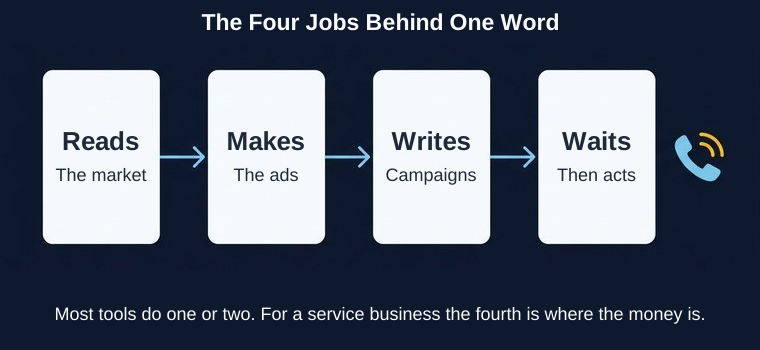
Work out which job has stalled for you before you compare prices. If your problem is that nobody has made a new ad since March, a budget-automation tool at $99 a month solves nothing.
We covered the roster version of this question in the agency guide, and the question of what to hand over versus keep in ad ops for an AI agent.
Why a service business reorders this list
Every roundup you'll read ranks these tools on cost per lead. A plumber gets paid for booked jobs. The distance between a lead and a booked job is where local ad budgets go to die.
Compare where the conversion happens in three businesses:
- Ecommerce. Somebody buys on your site. The pixel fires on your own checkout page. Meta sees the purchase and the dollar value within minutes.
- B2B software. Somebody requests a demo. The form fires a pixel event, then the real outcome sits in a CRM for six weeks. We wrote about that gap for software teams.
- A local service business. Somebody taps your ad and calls. The phone rings in a van. Whether that becomes a $400 drain clear or a wrong number happens entirely off Meta.
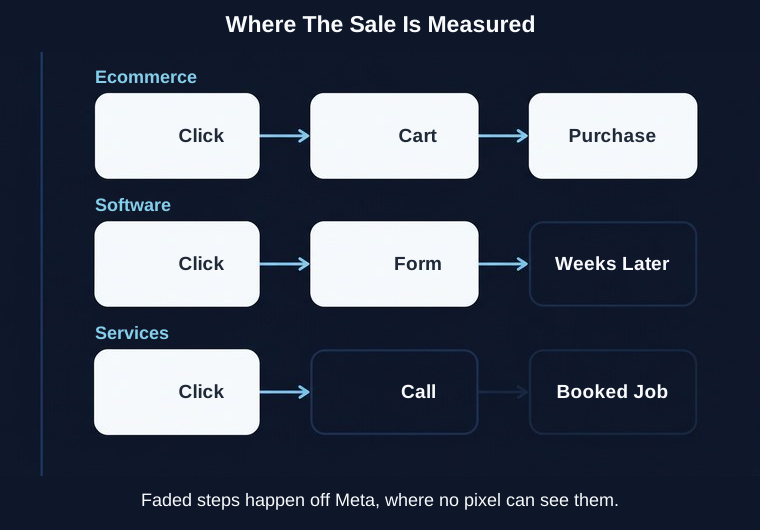
That last case changes the ranking. A tool that optimizes toward link clicks is selling you traffic and calling it lead generation. Your budget goes to whoever taps most, and people who tap most are frequently people who are browsing.
A call and a form fill are priced differently
Meta can optimize toward a phone call. The setting is called Quality Call, and Meta counts a result once the call connects and lasts 60 seconds. A minute of talking is a decent proxy for somebody who wants the work done.
Form fills are cheaper per unit. In the trades they're often worse per dollar. The person with a flooded kitchen calls the first number that looks like it will answer.
Two things to know before you switch:
- Call ads run on phones only. They don't appear on desktop placements. If your reporting shows a sudden drop in reach after you switch, that's why.
- No pixel can see a call. Your phone log or your CRM is the record. Meta reports the calls it counted, and matching those to booked jobs is manual work somebody has to do on Monday.
Meta's own published field reference leaves out one of the values its API requires to build a call campaign. We found that by having a campaign rejected with error subcode 2490408, then testing every combination until one worked. If the documentation is incomplete, expect some tools to have skipped this setting too.
If you have no conversion tracking at all yet, start with the Meta pixel walkthrough. Every conversion goal below assumes it's already in place.
Meta ads tools compared
If you have been pitched AI Meta ads for service businesses, this is the field. Prices pulled from each vendor's own pricing page on 24 August 2026.
| Tool | Best for | Service area | Optimizes for calls | Price | Skip it if |
|---|---|---|---|---|---|
| Mako Metrics | Getting campaigns built, not advice | Cities with a radius, or zips | Yes | $100/mo | You need video |
| Ryze AI | Running Meta and Google in one place | Managed for you | Not published | $89/mo | You want to keep control |
| AdAmigo.ai | Daily autopilot on a small budget | You set it | Not published | $99/mo per ad account | You want creative made |
| AdStellar | Shipping a first test this week | You set it | Not published | $100/mo, 50,000 credits | You want ongoing management |
| Madgicx | Rules-driven spend management | You set it | No | Not published | You want a price before signing up |
| Bïrch | Automation you write yourself | You set it | No | $49/mo up to $10K spend | Nobody enjoys writing rules |
| Meta Advantage+ | A free starting point | You set it, then it expands | Yes | Free | You need a tight radius |
| Claude or ChatGPT | Driving it yourself | You set it | Yes | Free, open beta | You want it to run unattended |
| AdCreative.ai | Volume of ad images | Not applicable | No | $39/mo | Creative is not your bottleneck |
| LocaliQ | Handing the whole thing over | Managed for you | Managed for you | Quote only | You want published pricing |
The 10 best Meta ads tools for local service businesses
1. Mako Metrics: Best for getting campaigns built, not advice
Jobs covered: Reads, makes, writes. Not waits.
May researches your category, produces eight creative concepts you can edit, and assembles the campaign in your own ad account with tracking attached. It arrives paused. You approve it, and only you can turn it on.
For this vertical, two settings matter and both are there. You name the cities or zip codes you serve, with a radius in miles. You pick the goal, and calls is one of them, which builds a Quality Call campaign with a Call Now button that dials the number you gave us.
Price: $100 a month for a single account. Agencies running a roster pay $499 for five accounts or $899 for ten, competitor reports included. See pricing.
Skip it if: You need video. We make still images only, and this is the vertical where before-and-after footage does the most work. Skip it too if what you actually need is somebody to answer the phone, because we stop at the campaign.
2. Ryze AI: Best for running Meta and Google in one place
The only AI-native product that showed up on page one for either search I ran. It manages paid ads across Google and Meta together, aimed squarely at local service providers, and it charges a flat monthly fee rather than a percentage of your spend.
Credit where it is due: multi-channel matters here in a way it doesn't for ecommerce. A roofer gets storm-season demand from Google search and builds awareness on Meta. Running both from one place is worth something, and we don't do it.
Treat their published results as marketing. Their site claims 3.4x more service calls and 45% lower cost per lead. A ROAS figure reads as 3.2x within eight weeks on one page and 3.8x within six weeks on another. Those numbers carry no methodology, no sample size, and they disagree with each other.
Price: $89 a month for Paid Ads Autopilot, with a 7-day trial. SEO Autopilot is $129, Traffic Printer $599, Ecom Autopilot $1,499. See pricing.
Skip it if: You want to keep hands on the account yourself.
3. AdAmigo.ai: Best for daily autopilot on a small budget
Jobs covered: Writes, waits.
The closest thing here to Meta ads automation for home services in the narrow sense: it watches your ad account daily and changes budgets and states based on what's happening. That's job three and a piece of job four. It won't make you a new ad.
The entry tier is explicitly aimed at accounts spending under $2,000 a month, which is where most single-location service businesses sit.
Price: $99 a month per ad account, or $349 for unlimited access. Flat, not a share of spend. See pricing.
Skip it if: Nobody has made a new ad since spring. Automation applied to three tired creatives produces the same three tired creatives on a better schedule.
4. AdStellar: Best for shipping a first test this week
Jobs covered: Makes, writes.
Credit-based rather than seat-based, so a slow month costs less. Good fit if you've never run a structured test and want something live quickly.
Price: $100 a month for 50,000 credits, and they front you $100 in credits to start. See pricing.
Skip it if: You want somebody managing it after launch. This gets you started, not maintained.
5. Madgicx: Best for rules-driven spend management
Jobs covered: Writes, waits.
Mature automation for shifting budget between ad sets on rules you define. Built for ecommerce accounts with many ad sets, which is a shape most local service businesses never reach.
Price: Not published. The pricing page shows "See price inside the app" and asks you to pick a spend bracket after signing up. The only public figure is a $49 a month Tracking Pro add-on. That was true when we checked in August for the B2B guide and it's still true today.
Skip it if: You want to know the price before handing over an email address. I'd skip it on that basis alone at this budget.
6. Bïrch, formerly Revealbot: Best for automation you write yourself
Jobs covered: Writes.
If you like building rules ("pause any ad over $40 cost per result, check every six hours"), this is the most direct way to do it. It renamed from Revealbot, so older reviews use the old name.
One thing to check against the others: the price is tied to your monthly ad spend across connected accounts, not flat. Essential covers up to $10,000 a month with overages past that. At $1,500 a month in spend you're comfortably inside it.
Price: $49 a month Essential, $99 a month Pro. See pricing.
Skip it if: Writing conditional rules sounds like a chore you'll do once and never revisit. That's the common outcome.
7. Meta Advantage+ and Ads Manager AI: Best free starting point
Jobs covered: Writes, waits, partially.
It's free, it's already in your account, and it can optimize toward calls. Start here before you pay anybody.
The tension worth knowing: Advantage+ audience expansion is designed to widen your targeting when it thinks it can find results outside your settings. That's useful for a national ecommerce brand and works against you when your van has a 25-mile range. Watch your delivery by location in the first week and turn expansion off if the map wanders.
Price: Free.
Skip it if: You need a tight radius held tight. Check the placement and location reports rather than trusting the setting.
8. Claude or ChatGPT via Meta's Ads AI connectors: Best for driving it yourself
Meta shipped connectors that let an assistant read and change your ad account while you type instructions. Free while the beta runs, and rollout is still account by account.
Useful if you're comfortable checking what it did. It won't produce your creative and it won't run while you're on a job.
Price: Free, open beta.
Skip it if: You want something running without you. This is a faster set of hands, not a replacement pair.
9. AdCreative.ai: Best for volume of ad images
Jobs covered: Makes.
Generates ad images and headlines at volume on a credit ladder. It does nothing about where your ad runs or what counts as a result, so it sits low on a list ranked by whether the phone rings. Included because you will be advertised to by tools in this category and it's worth knowing which job they cover.
Price: $39 a month on the entry tier billed monthly, dropping to $20 on annual, with a credit
ladder above it. One navigation note: there is no pricing page. The /pricing URL returns a 404
and the plans sit in a section partway down the homepage.
Skip it if: Something other than creative volume is what stalled, which is the usual case for a single-location service business.
10. LocaliQ: Best for handing the whole thing over
Not software you drive. It's a managed service with an assigned advisor, backed by the Gannett network, running campaigns across channels on your behalf.
I'm including it because it's the bridge to what the rest of page one is selling. If what you want is for this to stop being your problem, a managed service is the answer and no $99 tool will be.
Price: Quote only. Managed campaign pricing is not published.
Skip it if: You want published pricing, or you want to keep the account in your own name.
The most expensive setting in your ad account
This is the section I'd read if I only read one.
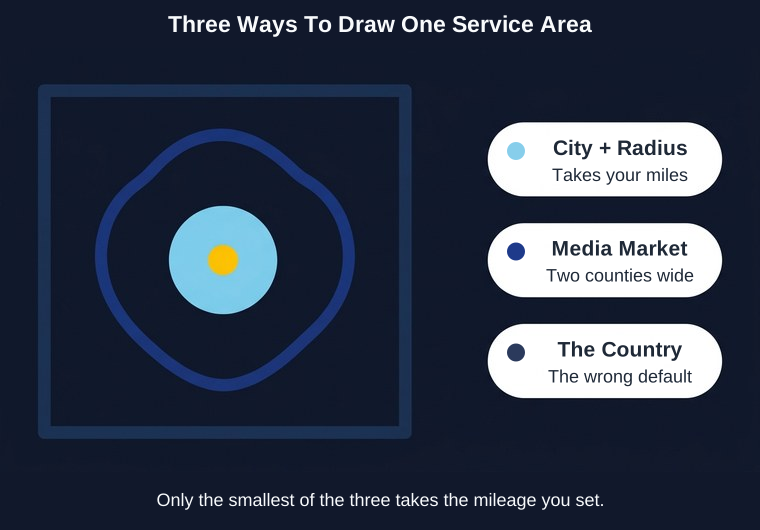
A service area is a shape on a map, and Meta gives you three ways to draw it. They behave differently:
- A city with a radius. "Dallas, Texas, plus 25 miles." This is what most service businesses want and it's the only one of the three that takes a mileage setting.
- A zip code. A fixed boundary. Your radius setting is ignored, because the zip already defines the area.
- A media market. A television region like Dallas-Ft. Worth. Two counties and change. Also ignores your radius.
The trap is that a tool can hand Meta the third one while showing you the first.
What happened when we tested our own
Our publisher had the whole United States hardcoded until 24 August 2026. We built the fix, wrote the tests, and then ran it against a real ad account before shipping. Three things broke, and all three involved text a customer would obviously type:
"Dallas, TX" matched the Dallas-Ft. Worth media market, not the city, and a media market can't carry a radius. The 25 miles the customer asked for was thrown away. The campaign would have delivered across two counties while our own interface implied a tight ring.
"Plano, TX" matched nothing at all. Meta's location index doesn't answer that format for every city. The publish would have failed with no useful explanation.
"Dallas" on its own returns five cities, in Texas, Georgia, Oregon, Pennsylvania and Wisconsin. Our code took the first result on trust.
The fix was to stop sending the state as part of the search, and use it to choose between results instead. Type a city in a state Meta doesn't have it in, and you now get told which states it does have it in. That beats spending three weeks advertising to the wrong Plano.
I'm telling you this because it's easy to get wrong, because we got it wrong, and because none of this surfaces in a dashboard. Every one of those campaigns would have built successfully, reported normally, and spent your money in the wrong place.
What to check, whatever you buy
Open the ad set in Ads Manager and look at the location block. Three questions:
- Does it name your town, or does it name a country?
- If it names a town, is there a mileage number next to it?
- If you gave a zip code, does the tool tell you the radius doesn't apply?
Any tool that can't answer those three from its own interface is asking you to trust it with the most expensive setting in the account.
Four questions for anyone selling you a Meta ads tool
- Show me the ad set you'd build for my service area. Not a mockup. The actual targeting block, before anything spends.
- What do you optimize toward, in Meta's own words? "Leads" is not an answer. "Quality Call" and "Offsite Conversions with a Lead event" are answers.
- What happens to round four? Does anything from this month's results change what gets made next month, or does a person have to notice?
- Who owns the ad account? If the answer is anything other than you, ask what happens to your data and your history when you leave.
What this costs against an agency retainer
The agencies on page one of this search quote around $1,500 a month to manage local Meta ads. Some are worth it. The tools above start free and cluster between $49 and $100 at the tier a single location needs, with top tiers running to $1,499.
That gap is the real decision, and money is only half of it. A retainer buys judgment and somebody to call. A subscription buys throughput and leaves the judgment with you.
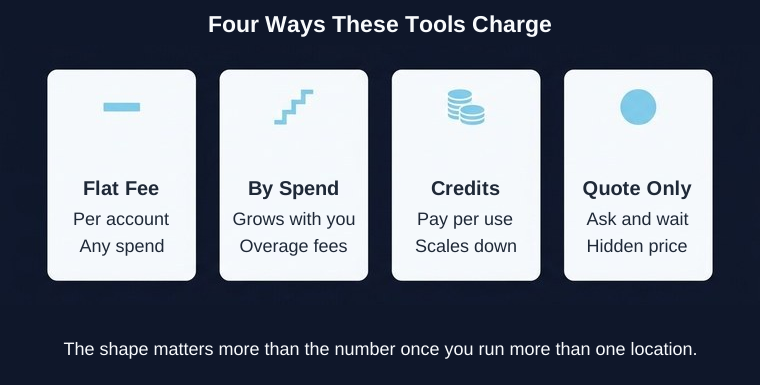
Four ways these products charge:
- Flat per account. Mako at $100, AdAmigo at $99, AdStellar at $100. Predictable. Scales badly if you run several locations as separate accounts.
- Tied to ad spend. Bïrch. Cheap at a local budget, and it grows with you whether or not the work grows.
- Credit-based. AdStellar and AdCreative. A slow month costs less, which suits seasonal work.
- Quote only. Madgicx and LocaliQ. You find out after you've given them your details.
At $1,500 a month in ad spend, a $99 tool is 6.6% of your budget. A $1,500 retainer is 100% of it, which means you're spending $3,000 to place $1,500. That math is fine when the agency lifts results enough to cover it, and brutal when it doesn't.
Seasonality, storms, and the budget floor
"Is $10 a day enough for Facebook ads?" is one of the questions Google shows most often alongside this search. The mechanical answer:
Meta rejects a conversion-optimized ad set below roughly $5 a day. We set our own floor at $6 to stay clear of it. So $10 a day funds one conversion ad set, not three. Split that budget across a test of three angles and all three stall in the learning phase, which is the most common way small local budgets get wasted.
Demand here is spiky in a way ecommerce isn't. Air conditioning in July. Roofing in the week after a hailstorm. Two consequences worth planning for:
- Ad scheduling needs a lifetime budget. If you want ads running only during hours somebody can answer the phone, Meta requires a lifetime budget on that ad set. A daily budget won't give you the scheduling option.
- A storm is not the time to start learning. An ad set that has never delivered takes days to find its footing. Keep something running at a low budget through the quiet weeks so the account has history when the phone should be ringing.
For what a lead actually costs across categories, see our Facebook ads cost benchmarks.
See what a round looks like before you pay for one
The hardest part of choosing here is that every product page shows you a finished ad and none of them show you the targeting block or the campaign it builds.
Our demo runs a real session on your brand: competitor research, then creative concepts, then the campaign assembled in an ad account and left paused. You see the goal, the service area and the conversion it optimizes toward before anything spends.
No card, and nothing can turn itself on.
How to choose, by business shape
One van, one town, under $1,500 a month. Start with Meta's own tools, free, and switch the goal to calls. If creative is what stalled, add a tool that makes ads. Don't buy budget automation yet; you don't have enough ad sets for rules to have anything to move between.
Three to ten vans, one metro. This is where a $100 tool earns its keep. You have enough volume for a conversion goal to learn, and enough creative demand to feel the production bottleneck. Set a city with a radius per crew territory if the territories differ.
Several locations in different metros. Separate ad sets per location, and check how your tool prices multiple accounts before you commit. Flat-per-account pricing multiplies fast.
Somebody answers the phone all day. Optimize toward calls. This is the case Quality Call was built for.
Nobody answers until evening. Use a form or an instant form, and use ad scheduling with a lifetime budget so you aren't buying calls at 11am that go to voicemail.
When to buy something else
Three situations where I'd tell you to buy from somebody else:
You need video. We make still images only. Scroll the Ad Library for any roofer or med spa and you'll see how much of the field runs before-and-after clips and a technician talking to camera. I have no performance data of my own to put behind that, but if video is your plan, we're the wrong tool and a creative-first product or a videographer is the right one.
You want one place for Google and Meta. Storm-season demand shows up in Google search first. Ryze runs both. We're Meta only and have no plans otherwise this year.
You want it to stop being your problem. A managed service like LocaliQ, or one of the agencies on page one, is a legitimate answer. Software gives you throughput and leaves you the judgment. If you don't want the judgment, don't buy software.
Two more limits on our side. Our service area is a text box you can typo, not a map you click. And nobody at Mako answers your phone, which in the trades is often the actual constraint. If half your calls go to voicemail, every cost per call in your reporting is wrong, and no ad tool fixes that.
FAQ
Is $10 a day enough for Facebook ads for a service business?
For one ad set, yes. For three, no. Meta rejects a conversion-optimized ad set below roughly $5 a day, so $10 funds a single one with a little headroom. Run one ad set with two or three ads inside it rather than splitting the budget across separate ad sets.
How much does it cost to hire someone to run Meta ads?
The agencies ranking for this search quote around $1,500 a month for local management. The tools in this post start free, and the tier a single location needs runs $49 to $100. At a $1,500 ad budget, a retainer doubles your total cost, so it needs to roughly double your results to break even.
Do Facebook ads work for contractors?
Yes, with one condition: you optimize toward something that resembles the job. Optimizing toward link clicks in a trade produces clicks. Optimizing toward calls or a Lead event produces contacts. The platform gives you what you ask for, and most contractors are asking for the wrong thing.
How do I advertise my HVAC company on Meta?
Most Facebook ads tools for HVAC companies get you as far as a running campaign, so the settings are on you. Set a service area as a city plus a radius, or your zip codes. Pick calls or a Lead conversion as the goal, not traffic. Keep one ad set funded above $6 a day rather than three underfunded ones. Run something small through the shoulder seasons so the account has history before peak.
Should Meta ads optimize for calls or form fills?
Calls, if somebody answers during ad hours. Meta counts a call once it connects for 60 seconds, which filters out misdials. Use forms when nobody can answer live, and pair them with ad scheduling so you aren't collecting leads that go stale overnight.
How do I make sure my ads only run in my service area?
Open the ad set and read the location block. It should name a city with a mileage number, or your zip codes. If it names a country, your budget is going out of state. If you're on Advantage+, check the delivery-by-location report in week one, because audience expansion can widen past what you set.
Can a tool book the job, or only get the lead?
Only the lead. Every product in this post stops at delivering a call or a form. Booking is your office, your dispatch software, or you. Anyone claiming otherwise is describing a call center, and that's a different purchase.
Which one to actually buy
Spending under $1,500 a month? Use Meta's own tools, free, with the goal switched to calls. Add a creative tool if production is what stalled.
Between $1,500 and $5,000, and you want the campaigns built for you? A flat-fee product at around $100 a month. We built May for this case, and I'd say the same about AdAmigo or AdStellar if their coverage of your particular stall is better than ours.
Above $5,000, or you want this to stop being your problem? A managed service or an agency. The retainer math starts working, and judgment is worth more than throughput at that level.
Whatever you pick, a Meta ads agent for local business runs on the same two settings. Open the ad set. Confirm the location names your town with a radius next to it. Confirm the optimization goal names something that resembles a customer rather than a click. Those two lines decide more about your return than the logo on the dashboard.