
You spent an afternoon in the Meta Ad Library. You have 40 competitor ads screenshotted into a folder, maybe tagged, maybe not. And then nothing happens. The folder sits there, your next test looks like your last test, and the research you did expires.
Maybe you run ads in-house and the folder never reaches your designer. Maybe you're at an agency and it never makes it into a single client brief. Same dead end. That gap, between "I looked at competitor ads" and "someone has direction to build from," is where most competitor research dies. Finding the ads was never the hard part. Turning them into direction is.
This post is the conversion step. You'll get a four-part workflow that takes a stack of competitor ads and produces one competitor ad creative brief, plus a copy-paste template and a worked example run on real ads. By the end you can sit down with a folder of competitor ads and walk away with a brief in one sitting.
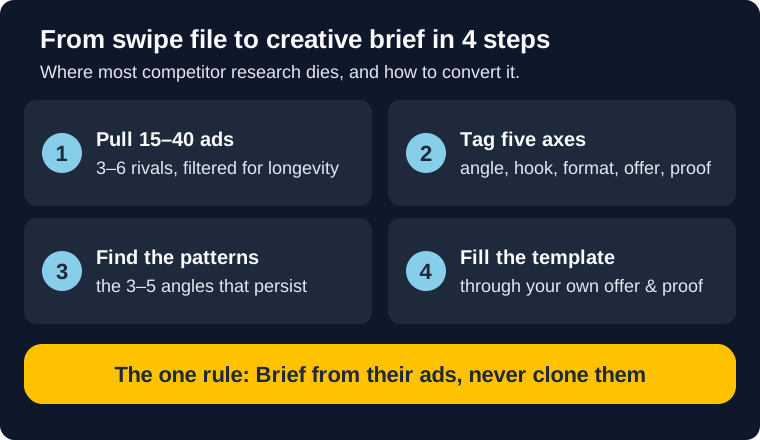
The short version
- Step 1: Pull the right ads. 15 to 40 across 3 to 6 competitors, filtered for longevity.
- Step 2: Tag each ad on five axes. Angle, hook, format, offer, proof. Fast sorting, not film criticism.
- Step 3: Find the repeating patterns. The 3 to 5 angles or hooks that recur and have persisted.
- Step 4: Fill the brief template. Translate the patterns through your own offer and proof.
- The one rule: brief from competitor ads, never clone them. Patterns are hypotheses, not finished ads.
Why competitor research dies in a swipe file
The bottleneck in competitor research isn't access. The Meta Ad Library is free, and if you want a system for finding ads fast, we've covered seven free ways to spy on competitor Facebook ads and how to use the Meta Ad Library already. Most paid media managers can build a swipe file in an afternoon.
The bottleneck is what happens next. A swipe file is raw input. It's 40 screenshots with no verdict attached. A designer, a freelancer, a creative strategist: none of them can build from 40 screenshots any more than you can cook from a full pantry with no recipe. Somebody has to do the work of turning observations into direction, and if that somebody is nobody, the research just sits there.
The cost shows up three ways. Test velocity stalls, because there's no brief, so there's no new creative in the queue. Your ads keep running until they fatigue, because nothing is lined up to replace them. And when you finally do brief someone, it's vague, so they build the wrong thing and you lose a week to revisions.
The stakes just look different depending on where you sit. In-house, a stale account is you explaining flat numbers to your manager. At an agency, it's a client asking what they're paying for, or a new-business pitch with no competitive angle to lead with. The swipe file was supposed to prevent exactly that.
The fix is a repeatable conversion step. Not a better swipe file. A brief.
Brief from competitor ads, don't clone them
There are two ways to get this wrong.
The first is ignoring competitor ads entirely. Every active ad in the Library is a small bet a competitor decided to spend money on. A long-running ad is a bet they've decided to keep funding. That's free market research, and skipping it means you're testing from scratch every quarter.
The second mistake is the opposite: copying an ad line for line. Cloning feels productive, but it's reactive. You don't know if the ad you're copying is a winner or a loser that just hasn't been killed yet. You don't know if the offer fits your margins. And you've now spent the budget arguing a competitor's positioning instead of your own, or your client's.
The brief is the disciplined middle. You extract the patterns that show up across multiple competitors, then translate them through your own offer, your own proof, and your own audience. The competitor ads tell you which doors are worth knocking on. Your brand decides what to say when the door opens. As Commit Agency puts it, competitor ads are inspiration, not templates to clone.
Every step below is built to produce direction, not duplicates.
The 4-step workflow: competitor ads to creative brief
Here's the path from a folder of screenshots to a finished brief. Four steps: pull the ads, tag them, find the patterns, fill the template. The first three are research. The fourth is the brief itself.
Step 1: Pull the right ads
Start in the Meta Ad Library. Search 3 to 6 direct competitors, not one. One competitor gives you that competitor's quirks. Several competitors give you the category's patterns, and patterns are what you're after.
Aim for 15 to 40 ads total. Fewer than 15 and you can't tell a pattern from a coincidence. More than 40 and the tagging step turns into a slog you'll abandon.
Filter for longevity, but don't worship it. An ad that's been running 90 days is a far stronger signal than one launched last week, because sustained spend is the closest thing to a public performance signal you'll get. The catch: a big brand can keep a mediocre ad alive on budget alone, so longevity tells you what a competitor is committed to, not always what's beating its targets. It's still the best filter you have. The Library shows each ad's launch date, so sort your pulls by how long they've been live and weight the long-runners.
For each ad, capture five things: a screenshot, the primary text, the headline, the format (static, video, carousel), and how long it's been running. That's the raw material for Step 2. Don't analyze yet. Just collect cleanly.
Step 2: Tag each ad on five axes
This is a fast sorting pass, not a teardown. You're labeling each ad so patterns become visible, not writing a critique. Move quickly.
Tag every ad on five axes:
- Angle. The core value proposition. Speed, price, ease of switching, status, a specific feature, a specific pain. One angle per ad. If you can't name it in three words, look again.
- Hook. What the first line or first frame does. Question, bold claim, callout to a specific audience, a number, a problem statement.
- Format. Static image, video, carousel, user-generated style.
- Offer. What the ad puts on the table. A discount, a free trial, a lead magnet, a guarantee, or nothing (a pure brand or feature ad).
- Proof. The evidence the ad leans on. Customer count, a named customer, a rating badge, a stat, a testimonial, or none.
A deeper read is possible. Motion's competitor analysis framework breaks ads down across concept, hook, script structure, visuals, pacing, and congruency, and it's worth using when you're doing a full creative teardown. For a brief, the five-axis version is enough. You need taggable, not exhaustive.
Put it in a spreadsheet. One row per ad, five columns. It should look like this:
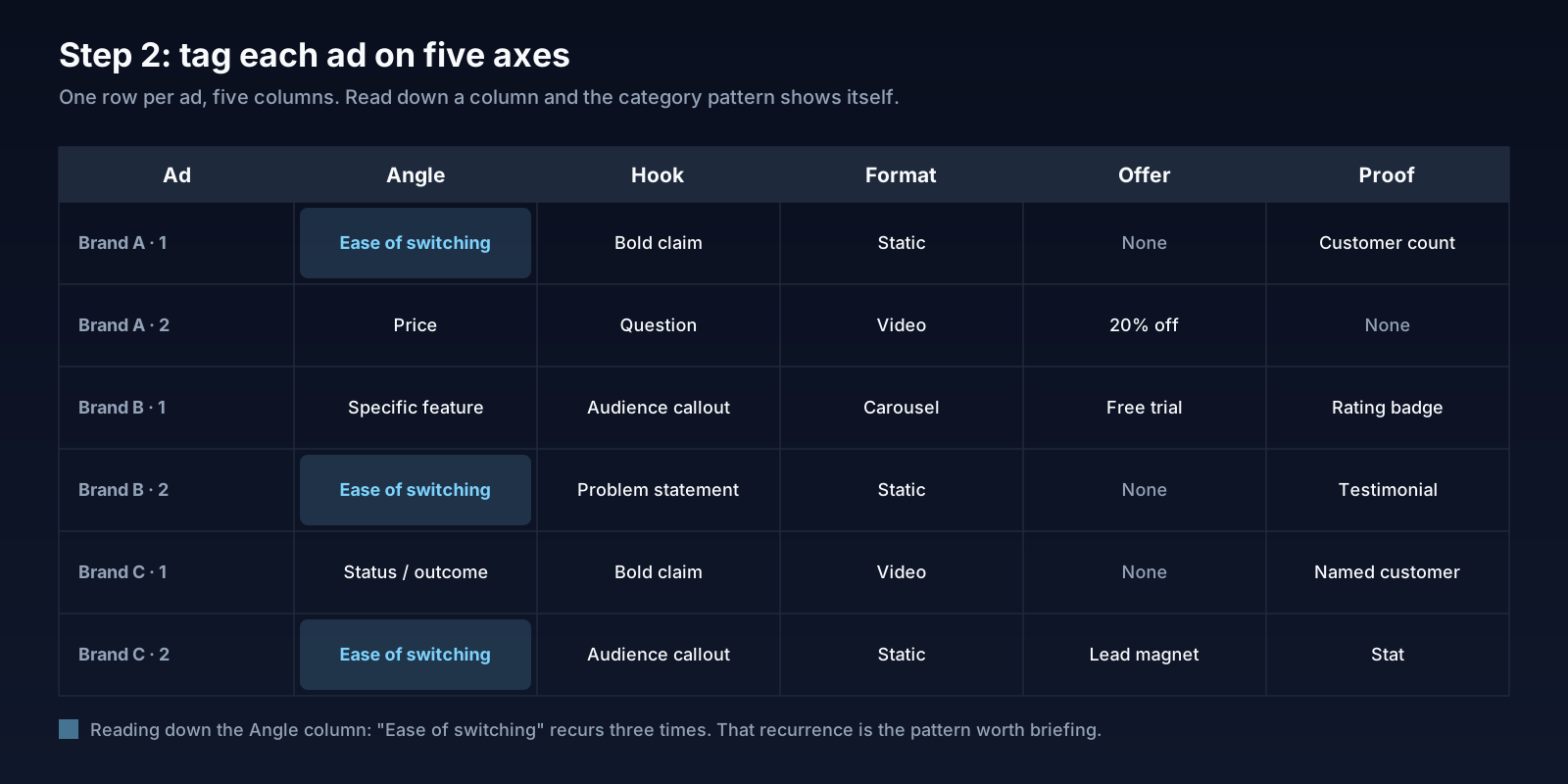
Step 3: Find the repeating patterns
Now read down the columns instead of across the rows.
In the Angle column, which value proposition shows up most? If 12 of your 30 ads are some version of "switching is easy," that's the category telling you what it thinks the buyer's biggest blocker is. Do the same for hooks, offers, and proof.
You're looking for two things at once: recurrence and persistence. A pattern that shows up across multiple competitors is a category signal. A pattern that shows up and has been running for months is a category signal someone is willing to defend with budget. When both are true, you've found something worth briefing.
Pull the 3 to 5 strongest patterns. That's your insight layer. Be honest that each one is a hypothesis, not a fact. You don't have anyone's CPA. What you have is a strong, evidence-backed guess about what's working in your market, and a strong guess is enough to brief a test.
Step 4: Fill the brief template
Now you write the brief. Every field below pulls directly from Steps 1 through 3, so this goes faster than it looks.
The template has eight fields: primary message, target audience, hook direction, format, key proof points, offer, CTA, and what to avoid. The primary message comes from your strongest angle pattern, translated into your brand's positioning. Hook direction comes from the hook column, written as 2 to 3 options your creator can riff on, not one locked line. Proof points come from your own brand, prompted by what the proof column showed competitors leaning on. The offer is your call, informed by what the offer column revealed about category norms.
Keep the whole thing scannable in five minutes. A brief that needs a meeting to explain is a meeting. The DTC creative brief structure from MHI Growth Engine reaches the same short-and-specific principle: primary message, hook direction, proof points, and not much more.
The competitor-sourced creative brief template
Here's the template. Copy it, paste it into your doc tool of choice, and fill it for every brief.
Competitor-Sourced Creative Brief
1. Primary message. The single most important thing this ad must communicate. One sentence. Pulled from your strongest competitor angle pattern, rewritten in your brand's voice.
Example: "Switching your payroll provider takes a weekend, not a quarter."
2. Target audience. Who this ad is for, specifically. One segment, not "everyone."
Example: "Founders of 10 to 50 person companies who are unhappy with their current payroll provider but dread the migration."
3. Hook direction. 2 to 3 opening options the creator can choose from or riff on. Drawn from the hook patterns you tagged.
Example: "(a) A question: 'Still on a payroll provider you hate?' (b) A timeframe claim: 'Switch payroll in one weekend.' (c) A callout: 'Founders: your payroll migration is not as scary as you think.'"
4. Format. Static, video, carousel, or UGC-style. Note what the category over-uses, because the gap is often the opportunity.
Example: "15-second talking-head video. The category is almost entirely static, so motion is the wedge."
5. Key proof points. The evidence this ad will use. Your numbers, your customers, your ratings. Prompted by what competitors leaned on, but sourced from your brand.
Example: "Average migration time of 2.5 days from our onboarding data. G2 rating. One named customer quote."
6. Offer. What the ad puts on the table. Your decision, informed by category norms.
Example: "Free migration concierge for the first month."
7. CTA. The action and the destination. Match it to the intent level of the audience.
Example: "'See how migration works' to a dedicated switching landing page."
8. What to avoid. The traps you saw in competitor ads, or positioning that doesn't fit your brand.
Example: "Don't promise instant setup. It's not true for us and the claim invites a bad first experience."
Eight fields, one page, five-minute read. That's the artifact a designer, creator, or freelancer builds from, whether you're running one account in-house or a dozen at an agency.
Worked example: briefing from Gusto's Meta ads
Theory is cheap. Here's the workflow run on real ads.
We recently published a full Gusto Meta ads teardown, pulling Gusto's 50 active image ads alongside Rippling and Paylocity. The DTC counterpart is the OLIPOP Meta ads teardown, if you want to see the same method on a 66-ad consumer-beverage library. The fintech counterpart is the Stripe Meta ads teardown on a 200-ad cut, and the multi-competitor category version is the fitness brand Facebook ads benchmark on Gymshark, Alo, and Hoka. That's our raw pull, Step 1 already done. Now run Steps 2 through 4 on it.
Step 2, tagging. A few representative rows, with verbatim ad copy from the Library:
- "Switch to Gusto today. Join 400k businesses." Body: "Switching is easy! Join Gusto to seamlessly pay, insure, and support your team today." Angle: Ease of switching. Hook: Bold claim. Format: Static. Offer: None. Proof: Customer count (400k). (Library ID 1615189103079575)
- "Automated payroll for solopreneurs." Body: "Save hours on compliance and thousands on your taxes as an S-corp. Try Gusto Solo today." Angle: Specific feature for a vertical. Hook: Audience callout. Format: Static. Offer: None. Proof: None. (Library ID 1940606943288700)
- "HR for Remote Teams." Body: "Your HR toolbox just got bigger. Now go build an even stronger team!" Angle: Feature for a vertical. Hook: Audience callout. Format: Static. Offer: None. Proof: None. (Library ID 952248017213139)
- "Your year-end cash reward is waiting. Add clients. Earn cash. Simple!" Body: "Help clients switch to Gusto this season and enjoy streamlined reporting, automation, and rewards up to $600 per client." Angle: Referral incentive. Hook: A number implied by the offer. Format: Static. Offer: Up to $600 per client. Proof: None. (Library ID 1453261246255009)
Step 3, patterns. Reading down the columns across Gusto's full set, three patterns hold up. Ease of switching is the dominant angle, roughly a third of the active footprint. Audience-specific feature pitches are the second cluster, with separate copy for solopreneurs, remote teams, and accountants. And the strongest persistence signal is the accountant referral campaign: an offer-led angle that's been running for 212 days, which is the clearest "this works" signal in the whole pull.
The gap is also visible. Gusto's cold-traffic ads rarely carry an offer. The real offer is gated to the accountant program. For a competitor, that's an opening.
Step 4, the brief. Translate the "ease of switching" pattern through a brief, the way a Gusto competitor would:
- Primary message: Switching payroll providers is a weekend job, not a quarter-long project.
- Target audience: Operations leads at 20 to 100 person companies who are unhappy with their payroll provider but assume migration is painful.
- Hook direction: (a) "Still dreading your payroll migration?" (b) "Switch payroll in a weekend." (c) "The payroll switch you've been putting off is easier than you think."
- Format: Short video. Gusto's switching ads are all static. Motion is the wedge.
- Key proof points: Your real average migration time. A named customer who switched. Your support response time.
- Offer: A migration concierge, free for the first month. This is the gap in Gusto's cold-traffic ads, so lead with it.
- CTA: "See how switching works," pointing to a dedicated migration landing page.
- What to avoid: Don't claim "instant." Gusto's "switching is easy" works because it's vague. A false speed claim invites a bad first experience.
Nothing in that brief is cloned. Every field is traceable to a pattern in the pull, then translated through a different brand's offer and proof. That's the whole move.
When to systematize this
Once the workflow clicks, the constraint shifts. It's no longer "I don't know how to brief." It's "pulling and tagging ads every week takes time I don't have."
That's the real cost at scale. The brief itself takes 20 minutes once you have the patterns. Steps 1 and 2, the pulling and tagging, are the slow part, and they're slow every single week. A reasonable rhythm is to brief 2 to 3 test concepts per cycle, which keeps your creative queue ahead of fatigue. But that rhythm only holds if the research half stays cheap.
A couple of ways to keep it cheap. Running this across a client roster? The workflow productizes cleanly, and we've written about packaging competitive analysis as a paid deliverable. If you want the targeting half of the picture alongside the creative half, reverse-engineering competitor targeting covers that. And the Meta Ad Library API can automate the pull if you have engineering time to spend.
The other option is to skip the pull entirely. A Mako Metrics Competitor Snapshot hands you the competitor ad set already gathered and theme-scored, so you start at Step 3 instead of Step 1. Whether that's one competitor or one per client, browse the sample reports on a few brands to see what the input looks like before it reaches your brief. If you're comparing research tools, we've evaluated ten Meta ads competitor spy and tracking tools to help you pick the right fit for your workflow.
Start with one competitor
The promise was a brief in one sitting, and the workflow delivers it: pull the ads, tag them on five axes, find the patterns, fill the template. The discipline that makes it work is the rule from the top. You're briefing from competitor ads, not cloning them. Patterns in, direction out.
Don't try to brief your whole category this week. Pick one competitor. Pull 15 of their longest-running ads. Run the Step 2 tagging pass. Even that much will surface a pattern you can put in a brief by Friday, which is more than the swipe file ever did.