You turned on Advantage+ Shopping because Meta made it sound easy: plug in your catalog, let the system find buyers, scale spend. A week later, Ads Manager shows a “healthy” ROAS, and your Shopify dashboard tells a different story. Or performance looks fine until you realize most purchases are from people who already buy from you, while prospecting never really turned on.
That confusion isn’t a skill issue. Advantage+ Shopping (ASC) is built to optimize inside a black box. You get less targeting control than a traditional catalog campaign, which means the only way to win is to become obsessive about signals (what’s actually working) and inventory hygiene (where your money is going).
This guide gives you a practical framework: how to know if ASC is truly working, how to identify “junk” delivery, and what levers you still have when the algorithm refuses to behave.

Bottom line
- Good Ads Manager ROAS isn’t proof: compare ASC to a manual baseline, check new vs. existing customers, and watch for account-level cannibalization.
- Junk inventory often shows up as cheap clicks from Audience Network, Marketplace, or right column placements with weak purchase intent, not “bad targeting,” just low-quality surfaces.
- You have fewer levers: account-level placement exclusions, existing customer budget caps, geo exclusions, and creative quality (creative is your targeting when audiences are broad).
- Creative collapse (one ad/asset taking almost all spend) is a fatigue signal. Refresh before ROAS rolls over.
- Hybrid beats purity: use ASC to scale what’s proven; keep manual campaigns for tests, promos, and tight control.
What Advantage+ Shopping Actually Does (And What You Give Up)
Advantage+ Shopping Campaigns are Meta’s automated catalog sales product. The pitch: Meta combines your product feed, pixel signals, and creative assets, then runs a broad optimization loop to drive purchases with less manual audience sculpting.
What you typically don’t get compared to older catalog setups:
- Fine-grained targeting the way you’d build it in a prospecting ad set (interests, tight lookalikes, layered exclusions, often limited or abstracted away inside ASC).
- Transparent “why” behind delivery. You’ll see outcomes, but not a clean map of every segment Meta chose.
That trade can be worth it when you have strong conversion volume, a clean catalog, and a steady creative pipeline. It’s painful when your account is thin on signals or when ASC uses cheap inventory to hit short-term efficiency metrics.
If your funnel context is shaky, start with our Facebook ads troubleshooting checklist. Tracking and offer issues look like “ASC is bad” when the real problem is upstream.
How to Tell If Your ASC Is Really Working

Ads Manager can look “green” while the business stays flat. That is the trap with ASC: the dashboard can make you feel safe while acquisition quality quietly slips. Here’s how to separate signal from theater.
1. Benchmark ASC Against a Manual Baseline (Apples to Apples)
Pick a window (7 or 14 days) and compare:
- CPA or cost per purchase on ASC
- CPA on your best manual catalog or prospecting campaign with similar products and geos
You’re not looking for a magic number. You’re looking for incremental efficiency. If ASC is “winning” on ROAS but only because it’s harvesting demand you would have captured anyway, that’s not a win. It’s attribution theater.
For context on what “good” looks like in ecommerce, pair this check with our ROAS benchmarks for Facebook ads and Facebook ads cost benchmarks (CPC, CPM, CPA).
2. Split New vs. Existing Customers (The “Quiet Retargeting” Problem)
ASC can lean hard on people who already know your brand, especially when your pixel is rich with purchase history. That can inflate ROAS while doing almost nothing for acquisition.
What to do:
- Use Meta’s reporting that breaks out new vs. returning customers (exact labels vary by account setup. Look for customer split reporting tied to your pixel/catalog).
- If a huge share of ASC purchases are existing customers, you’re often looking at budget going to repeat buyers: great for revenue, misleading if your goal was cold prospecting.
Existing Customer Budget Cap (when available) is the blunt instrument here: lowering it forces more prospecting, but can also reduce efficient repeat revenue. That’s not “fixing ASC.” It’s choosing a tradeoff.
Warning: Customer split metrics depend on signal quality. If your Pixel + Conversions API match is weak, customer reporting will lie quietly. Fix match quality and event coverage before you declare ASC “all retargeting.”
3. Check Incrementality at the Account Level
Ask a simple question: Did total new customer revenue rise when ASC scaled, or did ASC simply move credit around?
Practical checks:
- New customer count (Shopify/GA4) vs. pre-ASC period
- Blended MER (total ad spend / total revenue) alongside platform ROAS
- Overlap: Are manual campaigns collapsing while ASC grows? That can be cannibalization, not incremental scale
If you need funnel framing for how prospecting vs. retargeting should coexist, read full-funnel Facebook ads for ecommerce.
4. Confirm You’re Not “Learning Starved”
Broad optimization needs enough purchases to stabilize. If you’re under ~50 purchases per week (rule of thumb, varies by account), ASC may thrash: chasing noise, overfitting to cheap inventory, or overweighting easy conversions.
If you’re learning-limited or volatile, ASC isn’t “broken.” It may be underpowered for your volume.
5. Watch Creative Concentration (The Hidden Fatigue Signal)
ASC can pour spend into a single winning creative or template until performance decays. If one asset eats 80–90%+ of spend, you don’t just have a “winner.” You often have algorithmic collapse headed toward fatigue.
That’s directly connected to creative lifecycle: see 7 signs of Facebook ads creative fatigue for thresholds like frequency and CTR decay.
ASC hides complexity behind a simple dashboard. Breakdowns are where “junk” shows up: a placement or age band that soaks impressions but never purchases. You won’t fix what you don’t segment.
How to Spot Junk Inventory and Waste
In paid social, “junk inventory” usually means placements and surfaces that generate cheap actions but not profitable customers. For catalog advertisers, it also includes catalog SKUs that get impressions and clicks but never convert, clogging learning.
Placement Junk: Audience Network, Marketplace, Right Column
Audience Network can scale impressions fast. It’s not automatically bad, but it’s a common place to see volume without intent, especially if your creative looks “clicky” but doesn’t pre-qualify buyers.
Marketplace and right column placements can behave like filler inventory: users in a shopping mindset, but not always for your offer, or they’re low-attention environments.
What to look for in breakdowns:
- High CTR with weak purchase rate
- Lots of spend on a placement with high CPA vs. your Feed/Reels baseline
- A placement that drives add-to-carts but not purchases (if you track those events)
Retargeting Over-Delivery (People Who Don’t Need Another Ad)
If ASC repeatedly serves people who already purchased, or email subscribers who would convert organically, you’re paying for revenue you might have gotten anyway. That’s not “fraud,” but it’s often budget misallocation relative to your growth goals.
Catalog Junk: “Zombie SKUs”
Sometimes ASC fixates on products that rack up clicks but don’t sell, often due to pricing, stock, or bad PDPs. That’s inventory waste in the catalog sense: the algorithm explores, finds a dead end, and sometimes keeps trying.
Geographic and Demographic Pockets
Break down country/region and age/gender where supported. Junk shows up as:
- Regions with cheap traffic and no purchases
- Age bands with clicks but no ROAS
Quick Junk-Spotting Checklist (Weekly)
- Placements: Compare CPA by placement; flag outliers.
- Creatives: Flag one asset dominating spend with rising CPA week over week.
- Customers: Review new vs. returning mix against your growth target.
- Products: Identify top spend SKUs with weak purchase rate; fix PDP/price/stock.
- Blended metrics: If platform ROAS improves but Shopify new customers don’t, pause. Something’s off.
How to Cut Junk Inventory (Without Breaking ASC)
ASC will never give you full manual placement control like the old days. Your job is to use the controls that exist, and use creative + catalog discipline as your “targeting.”
1. Account-Level Placement Controls (Use Carefully)
Meta has introduced limited placement exclusions for Advantage+ Shopping at the account level in many accounts. Translation: you may be able to exclude a small set of placements (often including parts of Audience Network, Marketplace, and right column (exact options vary by account and time).
Critical caveat: These settings can be account-wide and may affect all ASC campaigns. Don’t toggle blindly. Test the change, watch total account CPA for 5–7 days, and revert if prospecting tanks.
2. Existing Customer Budget Cap (Prospecting vs. Repeat Revenue)
If ASC is overweighting existing customers, lowering the cap can force more prospecting, but you may sacrifice cheap repeat purchases. This is a business decision, not a hack.
3. Geographic Exclusions for Obvious Waste
If certain regions consistently produce clicks and no purchases, exclude them if your business can support it (shipping, margins, fraud patterns). This is one of the cleaner “surgical cuts” available when ASC spends broadly.
4. Creative as Targeting: Feed the Algorithm Better Inputs
When targeting is broad, creative does the filtering. That means:
- Strong hooks that repel non-buyers (not just “high CTR” bait)
- Angles that match intent (price, quality, speed, social proof)
- Frequent refreshes when spend concentrates and CPA drifts
This is also where competitive intelligence helps. Understanding what offers and hooks work in your niche keeps your ASC feed from turning into a pile of generic templates. If you want a structured way to research competitor ads, try the Mako Metrics free tool.
5. Catalog Hygiene: Remove or Fix Zombie SKUs
Pause out-of-stock variants, fix broken URLs, and tighten titles/images for products that get clicks but never sell. You’re reducing the search space for bad “inventory exploration.”
Fix Inventory in the Feed (Creative + Catalog)
- Creative: Replace collapsing winners; test 3–5 new concepts per month minimum for active spend.
- Catalog: Fix PDP load speed, price consistency, and variant errors. ASC amplifies catalog problems.
- Offers: If competitors run aggressive promos, your ASC may look “bad” when it’s actually an offer mismatch.
When to Pause ASC and Go Manual
ASC isn’t a religion. It’s a tool. Consider stepping back to manual catalog or prospecting when:
- CPA is consistently worse than your manual baseline after a fair test window (often 10–14 days at meaningful spend, not two days of panic)
- Customer mix is wrong and caps/exclusions can’t fix it without harming revenue
- You need tight control: geo promos, SKU launches, regulatory restrictions, or creative tests that ASC keeps misallocating
- Signal volume is too low to justify broad automation
Warning: Don’t judge ASC on a bad week during a site outage, creative misfire, or tracking disruption. Confirm incrementality and signal health first. Otherwise you’ll “fix” the wrong layer.
The Hybrid Approach That Usually Wins
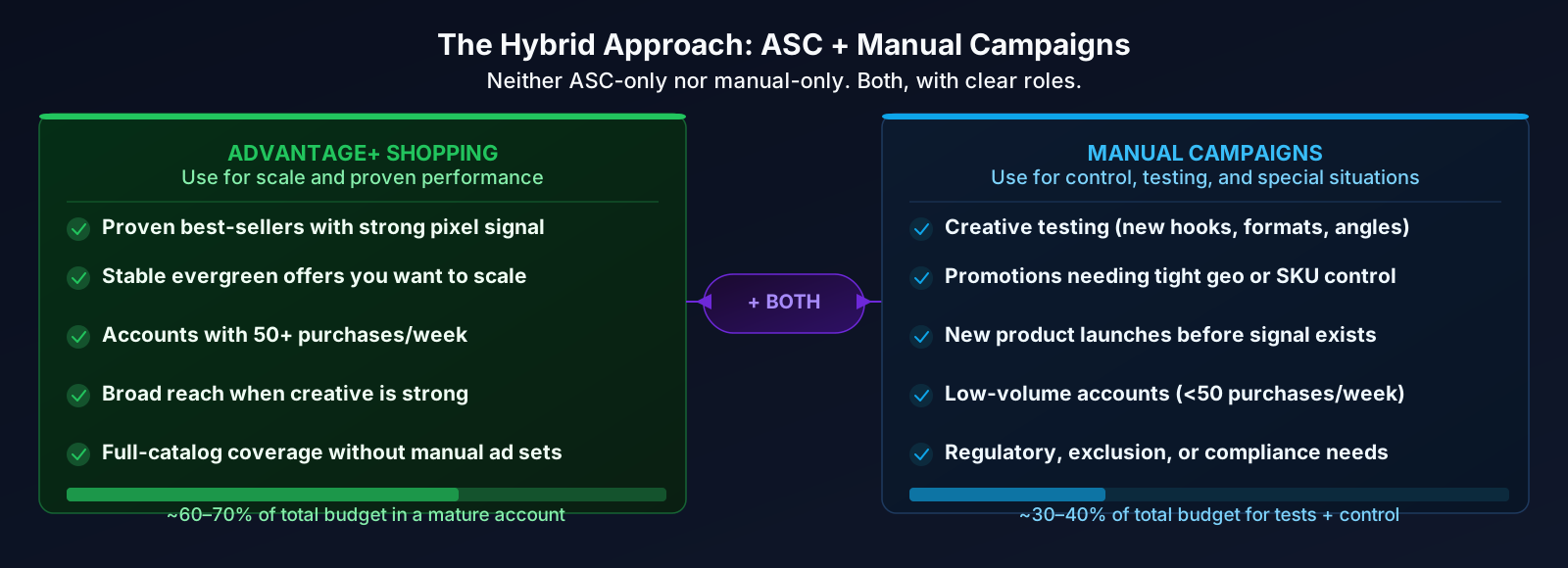
The teams that win on Meta rarely run only ASC or only manual campaigns. The common setup:
- ASC scales proven SKUs and stable offers where the algorithm has room to work
- Manual campaigns handle testing, promos, exclusions, and moments where control beats automation
That hybrid maps cleanly to a full-funnel mindset: prospecting and retargeting working together instead of fighting for credit, like we outline in our ecommerce funnel guide.
Ready to Spy on Your Competitor's Ads?
See what creative angles and offers competitors rely on, then feed your Advantage+ campaigns better inputs.
Try Free ToolWhat to remember
- Treat ASC like a black box you audit weekly: baseline vs. manual, new vs. existing customers, and account-level incrementality matter more than single-campaign ROAS.
- Junk inventory shows up in placements, creative concentration, and “zombie SKUs”: use breakdowns, not gut feel.
- Placement exclusions and customer caps are blunt tools: test changes carefully; account-wide settings can have side effects.
- When targeting is limited, creative and catalog quality are your levers: refresh winners before collapse, fix feed errors, and validate offers against the market.
- Go hybrid: use ASC for scale where automation has enough signal; use manual campaigns for control and testing.