
You're an hour into the Ad Library on three named competitors, eight tabs deep, and you still can't tell which of them is shifting strategy this quarter. You can see every ad they're running. You can read every hook. You still don't have an answer.
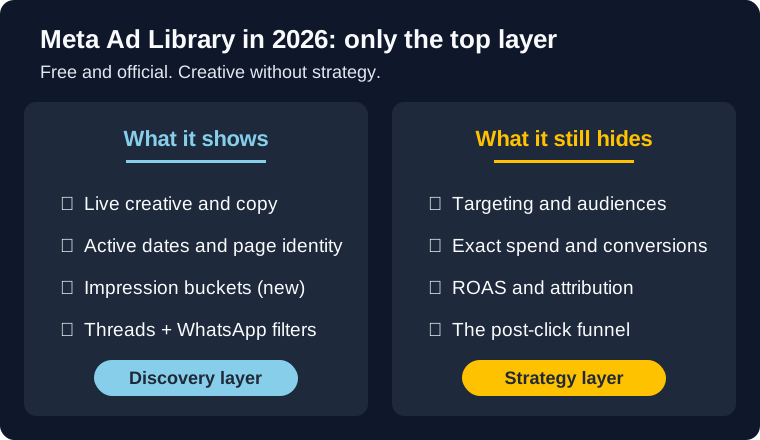
That's the trap. Meta Ad Library shows you the top layer of every commercial ad: creative, copy, page identity, active dates, and as of January 2026, a delivery-volume bucket. It does not show you targeting, exact spend, conversions, attribution, or the post-click logic that decides whether an ad actually works. You can study the visible layer for a whole afternoon and walk away with creative without strategy.
This guide covers both ends of the problem: how to get real value from the free Library, what it still hides in 2026, and the 5 paid alternatives mapped to the gaps.
Bottom line
- Transparency tool, not a performance dashboard. The Library helps you discover ads, not verify profitability.
- January 2026 update: impression range buckets (under 1K to 1M+), a Low Impression Count badge under 100 impressions, plus Threads and WhatsApp as standalone platform filters.
- Still hides: targeting, exact spend, conversions, ROAS, attribution, and the post-click funnel.
- Enough for 1 to 2 casual competitors. Stops being enough at 3+ competitors, shareable deliverables, or longevity sorting.
- 5 alternatives mapped to gaps: Mako (done-for-you), BigSpy (cross-platform), AdSpy (Meta-only depth), Foreplay (creative swipe file), Ads Archive API (DIY).
What Meta Ad Library is
Meta Ad Library (formerly the Facebook Ad Library) is Meta's public ad-transparency tool for Facebook and Instagram. You can search advertisers, browse active ads, and review public ad creative without logging into Ads Manager. The official entry point is the public Meta Ad Library.
For marketers, that makes it the fastest free way to answer a few important questions:
- What creative is a competitor running right now?
- How many variations are they testing?
- Which offers, hooks, and formats keep showing up?
- How long has a specific ad been live?
That's valuable. It is also where false confidence starts. You can copy the visible ad and still miss the offer, landing page, retention play, or budget logic that made it work. But it helps to separate three things people lump together:
| Tool | Best for | What you actually get | Biggest limitation |
|---|---|---|---|
| Meta Ad Library | Manual research and discovery | Live ads, creative, copy, page identity, active dates, impression buckets | Thin commercial-ad context |
| Ads Archive API | Programmatic access to public archive data | Structured access to public ad fields through Meta's Ads Archive API docs | Still does not become a performance dashboard |
| Third-party spy tools | Monitoring, alerts, saved workflows | Convenience, organization, and sometimes historical convenience layers | Often oversell insight you still cannot verify |
If you're just getting started with free research workflows, our guide on 7 free ways to spy on competitor Facebook ads is the best tactical companion to this one.
How to use Meta Ad Library
The mechanical part is simple. The useful part is not.
Here's the clean workflow I recommend:
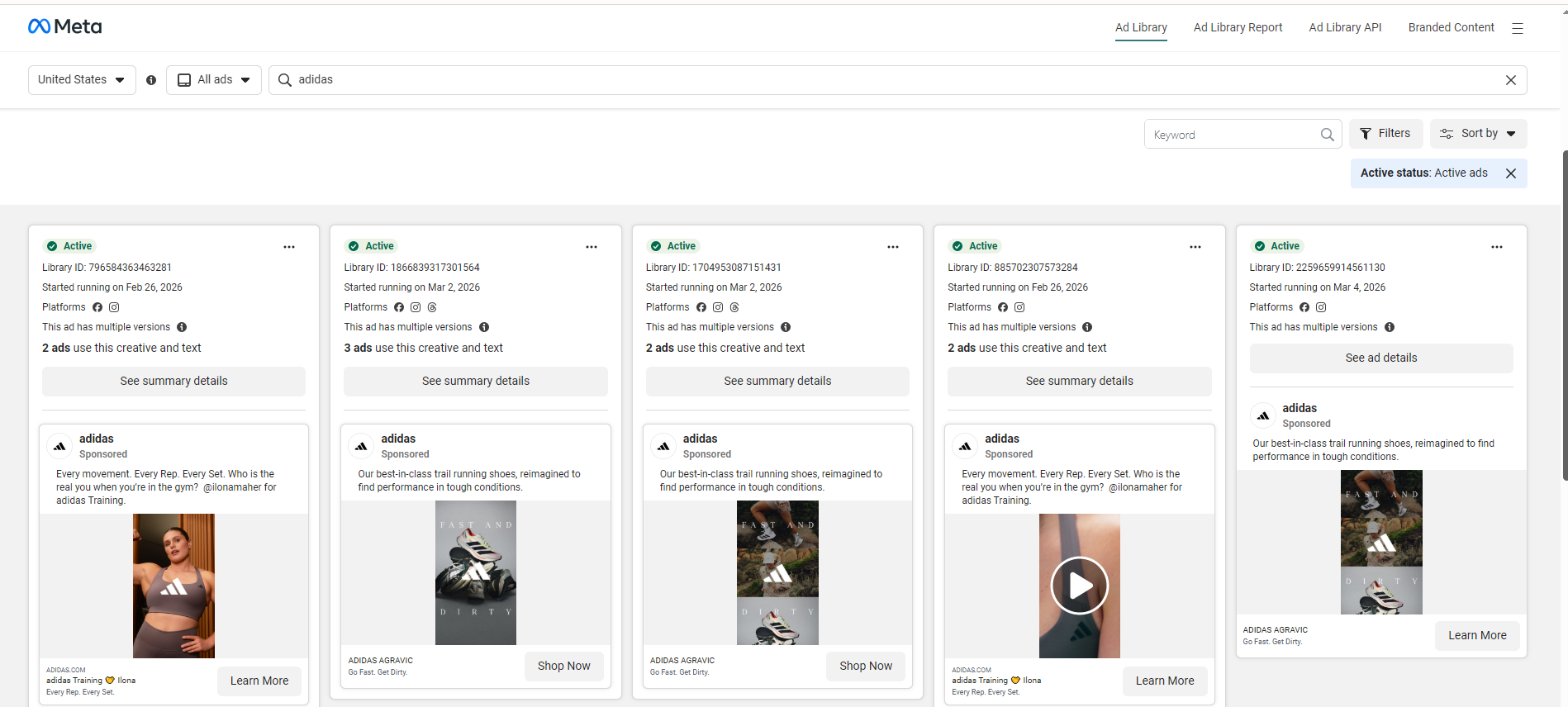
- Open the public Meta Ad Library.
- Set the country first. This matters because the ads you see depend on geography.
- Search the advertiser by exact page name whenever possible, not just the broad brand term.
- Review active ads first. That's the highest-signal set for commercial research.
- Capture patterns, not screenshots alone: hooks, offers, formats, product focus, landing pages, and dates.
Most people stop at step five and still get almost nothing from the tool because they use it like a mood board instead of a research process.
What to look for while browsing
- Repeated hooks: if the same angle keeps showing up, that angle probably matters
- Creative families: multiple variants around one message usually mean active testing
- Date patterns: recent launches vs ads that have stayed live
- Platform clues: which ads appear across Facebook and Instagram, and which seem tailored to one environment
- Offer consistency: discount, bundle, urgency, education, UGC, before/after, or social proof
- Impression buckets: the new delivery-volume tier (see the next section) gives a rough sense of how hard the ad is being pushed
Franchise pages, regional pages, and slightly different page names can fragment what you see. If you know the exact Facebook Page, use that. If you don't, verify the page identity before assuming you've found the full ad set.
One more thing. The exact UI labels and filters can change. That's normal. The durable skill is knowing what evidence to collect once you're inside.
What Meta Ad Library actually shows in 2026
For commercial advertisers, Meta Ad Library is best at showing the visible top layer of the ad. The 2026 release added two new signals worth knowing.
| Ad Library shows | Why it matters |
|---|---|
| Creative assets | You can study images, videos, UGC style, product shots, and visual hooks |
| Ad copy | You can compare headlines, body text, and CTA framing |
| Active dates | You can see when an ad started running and whether it's still active |
| Page identity | You can verify who is behind the ad and whether the page is the right advertiser |
| Variations | You can spot creative testing and message families |
| Impression range bucket (new, January 2026) | Every commercial ad now carries a delivery-volume tier: under 1K, 1K–5K, 5K–10K, 10K–50K, 50K–100K, 100K–500K, 500K–1M, 1M+ |
| Low Impression Count badge (new) | Flags ads with fewer than 100 impressions, useful for separating real tests from durable winners |
| Platform clues | Six platforms now filter independently: Facebook, Instagram, Messenger, Audience Network, Threads, WhatsApp |
Read the impression bucket honestly. A 100K–500K bucket on a 60-day-old ad means something different from the same bucket on a 5-day-old ad. Pair the bucket with longevity, don't substitute one for the other. When most of a competitor's ads cluster at the Low Impression Count floor, they're testing, not scaling.
That's enough to tell whether a competitor leans into founder-led UGC, discount hooks, static catalog creative, or problem-solution videos, whether they're pushing one hero offer or scattering effort across five weak ones, and whether they're testing breadth or focusing on a narrow message family.
Where people go too far is using visible creative as proof of invisible strategy. Sometimes that works. Often it doesn't. Our deeper guide to reverse-engineering competitor targeting is built for exactly that gap. Ad Library gives you fingerprints, not the full case file.
What it still hides
This is the part too many Ad Library guides rush through, and it's where the 2026 update changed less than people assume.
| Ad Library hides | Why that matters |
|---|---|
| Standard commercial targeting | You cannot see the actual audience settings competitors use |
| Exact spend, CPM, and budget | Impression buckets give a delivery-volume proxy, but not dollars. You still can't tell budget split, CPM, or whether the ad is profitable |
| Conversions and revenue | You cannot confirm CPA, ROAS, or profitability from the library alone |
| Attribution context | You do not know how the advertiser measures success or what conversion window is in play |
| Persistent change tracking | Manual browsing is still weak at alerting and weak at week-over-week change monitoring |
| Landing-page quality | The ad is only one piece of the funnel |
That last point is easy to underestimate. A decent ad plus a better landing page can beat a better ad plus a weak page. If your own Facebook ads are not converting, Ad Library alone won't tell you where the breakdown happens.
Warning: The biggest Ad Library mistake is treating visible ads like full-funnel truth. Commercial advertisers can hide a lot of strategic context simply because the tool never exposed it in the first place.
Commercial ads vs political/social issue ads
This distinction matters because people regularly read political-ad transparency assumptions into commercial-ad research.
Meta's transparency rules are stricter for social issue, electoral, and political ads. You can see that in Meta's own help documentation around page responsibility and disclaimers for those ad categories (Facebook Help Center). That richer disclosure model is not what normal ecommerce advertisers get.
Here is the practical difference:
| Visibility area | Commercial ads | Political / social issue ads |
|---|---|---|
| Creative and copy | Yes | Yes |
| Page identity | Yes | Yes |
| Active dates | Yes | Yes |
| Impression range bucket | Yes (2026 update) | Yes |
| Standard targeting settings | No | More transparency than commercial, but still not a full media plan |
| Exact spend / dollar transparency | No | Yes (spend ranges and additional disclosure) |
| Disclaimer / responsibility details | Limited | Much richer |
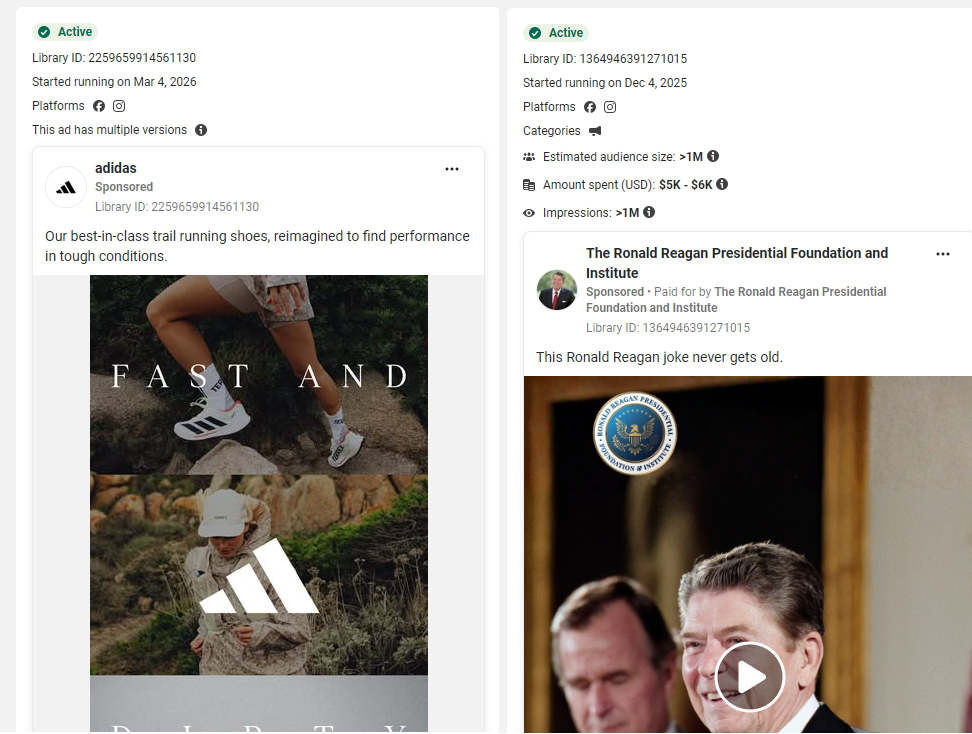
If you're researching ecommerce competitors, assume you are working with the commercial-ad version of the tool. That means less visibility than many screenshots on the internet might lead you to expect, even after the 2026 update.
Hidden limitations most guides gloss over
These are the Meta Ad Library limitations the official help docs don't name, and that most "how to use" guides skip past. Each one skews a competitive read.
1. Ad longevity is useful, but imperfect
I still think ad longevity is one of the best clues in Ad Library. If a creative has been live for weeks, that usually means it cleared some internal bar. But "still live" does not automatically mean "printing money."
A brand may keep a mediocre ad running because it supports a broader campaign, feeds retargeting pools, or simply has not been reviewed yet. Long-running ads deserve attention. They do not deserve blind trust.
2. "Winning ad" inference can be wrong
This is where a lot of lazy competitive analysis goes off the rails. People see an ad that has been live for 40 days and call it a winner. Maybe it is. Maybe it is a broad prospecting asset with weak direct efficiency. Maybe it is a low-spend holdout. Maybe it is one piece in a bundle strategy.
I use longevity as a prioritization signal, not a verdict.
3. Placements tell less than they used to
Meta's automation makes placement analysis less clean than it once was. When advertisers rely more on automated delivery, the placement mix tells you less about intentional segmentation and more about how the system found inventory.
That's why I would never build a whole targeting theory from placements alone. Use them as a clue. Nothing more.
4. Manual browsing creates bias
Manual Ad Library research is vulnerable to all the classic research mistakes:
- Recency bias: you overweight what launched recently
- Survivorship bias: you assume visible holdouts are all strong performers
- Selection bias: you only check the brands you already know
- Context loss: you study ads without checking product pages, offers, or checkout flow
This is why structured note-taking matters more than people think. A random screenshot folder is not a research system.
5. Ad Library shows the ad, not the funnel
This one is the real ceiling. You can study the ad and still miss the actual strategy because the landing page, offer architecture, email flow, and retargeting logic do the heavy lifting. That's why the best competitor research pairs Ad Library with landing-page review, page transparency, offer tracking, and direct funnel walkthroughs.
6. Country scope, login gates, and search precision get in the way
Three smaller friction points that don't show up in most guides:
- Country scope: the Library is country-scoped. An ad running in the US won't show if you've selected the UK. Multi-country research means checking each market individually.
- Login prompts: as of 2026, certain Library views may prompt you to log into a Facebook account. Not a hard block, but a friction the older guides don't mention.
- Search precision: brand-name searches sometimes return ads from similarly-named entities. Keyword searches inside ad text miss ads where the keyword lives in the image, not the copy.
Each one is small. Stacked, they skew the read if you don't know they're there.
A weekly workflow that gets real value
You do not need a huge process. You do need a repeatable one.
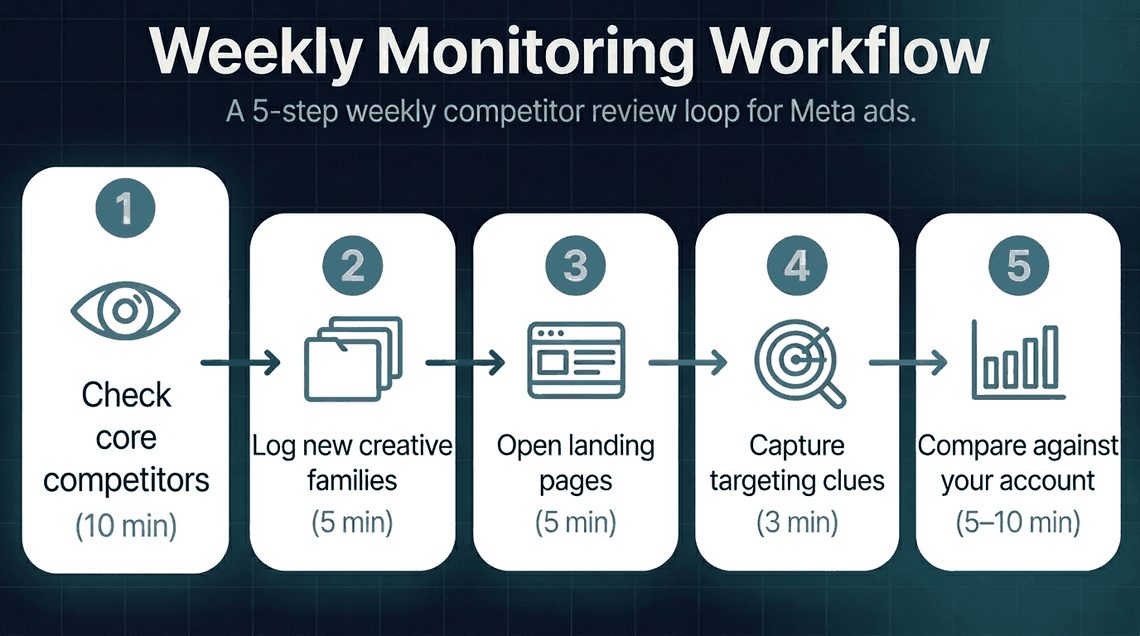
Here's the weekly workflow I'd actually use:
| Step | What to do | Time |
|---|---|---|
| 1. Check core competitors | Review 3-5 priority pages in Ad Library | 10 min |
| 2. Log new creative families | Note new hooks, offers, and formats | 5 min |
| 3. Open the landing pages | Check whether the page promise matches the ad | 5 min |
| 4. Capture targeting clues | Use "Why am I seeing this ad?" when available and log it | 3 min |
| 5. Compare against your account | Ask what they are doing that you are not testing yet | 5-10 min |
That is enough to produce useful signal if you do it every week.
What I would save in a swipe file:
- brand
- page URL
- ad start date
- hook
- offer
- format
- platform clue
- impression bucket
- landing-page angle
- reason it matters
If you want the broader competitor-research workflow around this, the 7 free ways to spy on competitor Facebook ads guide covers the techniques you can stack with the Library. And if you run an agency and want to productize this research as a paid client deliverable instead of free pitch work, see the $500 line item missing from your Meta ads agency proposal.
5 Meta Ad Library alternatives (when free isn't enough)
All five tools below build on top of the same public Meta data the free Library uses. None of them have access to anything you don't. What they sell is the work done on top of that data: analysis, organization, breadth, depth, or a custom pipeline. Which one is worth paying for depends on which Library gap you've actually hit, not on which has the loudest landing page.
| Tool | Best for | Pricing | Output |
|---|---|---|---|
| Mako Metrics | One named competitor analyzed for you | $24.99 / report or $79.99 / quarter | PDF report you can forward |
| BigSpy | Cross-platform breadth across 10 networks | Free / $9 / $99 mo | Searchable dashboard |
| AdSpy | Meta-only database depth and historical archive | $149 / mo | Searchable database |
| Foreplay | Creative swipe-file and inspiration workflow | $59 / mo and up | Tagged swipe-file library |
| Meta Ads Archive API + DIY | Engineering-team pipeline at scale | Free (engineering time) | Whatever you build |
Mako Metrics: when you want one competitor analyzed for you
Mako is the only tool on this list that's a service, not a database. You name a competitor, an analyst pulls their currently-running Meta ads from the same Library you'd use, then delivers a PDF: creative families, hooks, offers, longevity, CTA mix, and the gaps you can move into. Turnaround is 24 hours.
We can't see anything in the Library you can't. We do the reading.
Best fit: 1 to 3 named competitors, Meta-only spend, a recurring need to brief a creative team or a client. Snapshot is $24.99 per report; Market Dominator is $79.99 a quarter for up to five competitors with tracking across the period. Either beats $99 a month on a dashboard you check twice.
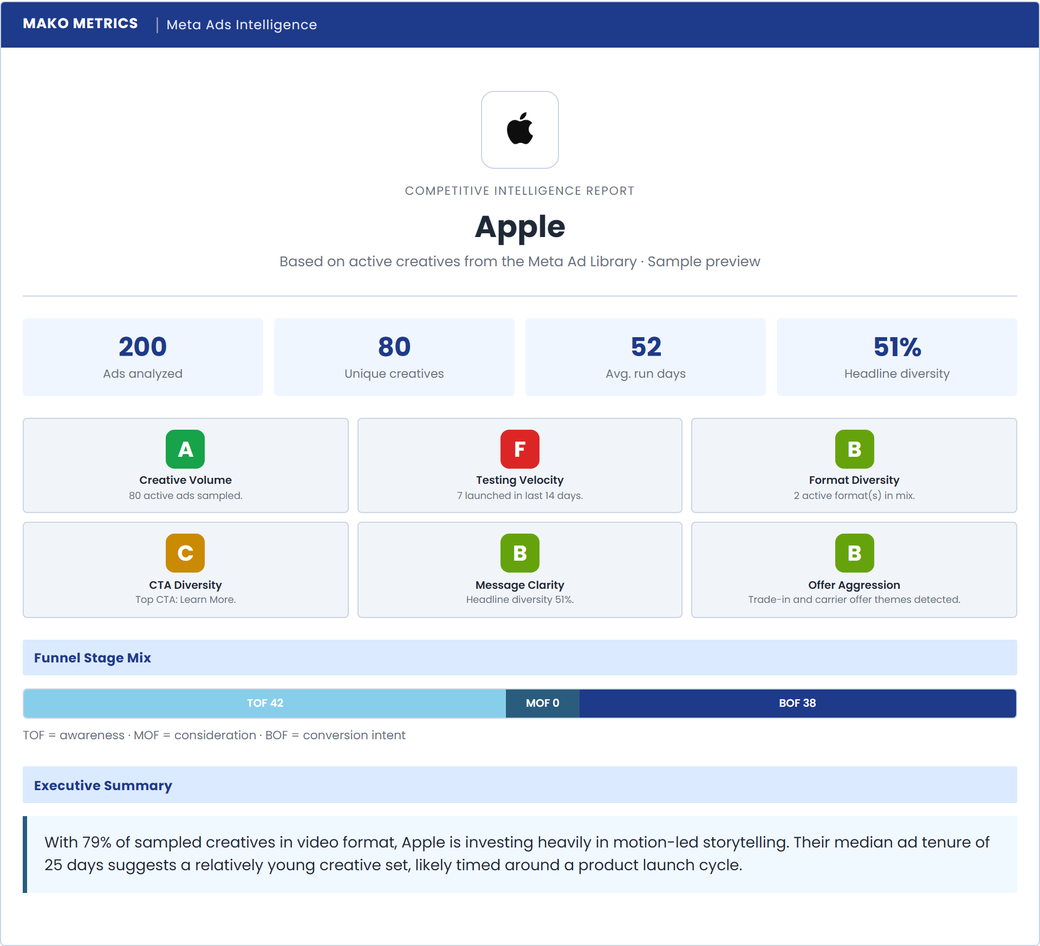
A real Mako Metrics report on Apple. This is what an analyzed teardown looks like.
Past random scrolling?
Browse a finished competitor report on a real brand: creative patterns, active ad examples, and the angles worth testing next, instead of another afternoon in the Ad Library. Free to browse, no login.
See Sample ReportsBigSpy: when you need cross-platform breadth
BigSpy is the cheapest entry point in the category and the broadest: ten platforms in one dashboard (Meta, TikTok, YouTube, Google, X, Pinterest, Yahoo, Unity, AdMob, Messenger) and over a billion ads in the index. Free tier, $9 a month Basic, $99 a month Pro.
Best fit: You run paid across more than one channel and want one login. Trade-offs: The index is mostly historical (a lot of indexed ads are no longer live), and if you only run Meta you're paying for nine platforms you don't open.
For the full head-to-head, see Mako Metrics vs BigSpy.
AdSpy: when you want Meta-only database depth
AdSpy is the legacy depth play in Meta+IG spy: same scope as the Library, but with the largest searchable historical archive, going back years. Filters by advertiser, country, language, ad type, comments, engagement.
Best fit: Historical creative archaeology, ad-copy researchers, teams that will log in five days a week. Trade-offs: $149 a month, steeper learning curve, you still do all the analysis.
For the pricing breakdown, see how much AdSpy costs.
Foreplay: when you want a creative swipe-file workflow
Foreplay is a different category. Not a competitor-monitoring tool; a tagged swipe-file library that pulls from the Ad Library and adds organization on top: boards, tags, share links, brief-export. Built for creative strategists and designers collecting references for the next shoot or brief.
Best fit: Agency creative teams, in-house designers. Trade-offs: Closer to the workflow than the data, you still bring the analysis. Starts at $59 a month.
Meta Ads Archive API + DIY: when you have an engineering team
The Ads Archive API is Meta's free programmatic access to the same public dataset the Library exposes. Real, free, rate-limited. Engineering time isn't.
Best fit: Teams building in-house competitive intel platforms, agencies productizing their own offering. Trade-offs: You build everything (search, storage, dedup, UI, analysis). The Library is the data; you ship the product around it.
Quick decision rule
Pick by the gap you've hit, not by the feature checklist:
- 1 to 3 named competitors and you want the read done: Mako.
- Cross-platform (TikTok, YouTube, Google) in one place: BigSpy.
- Meta-only and you'll do the work yourself: AdSpy.
- Creative swipe file for designers and strategists: Foreplay.
- You're building your own pipeline: the Archive API.
- None of the above: stay free. The next section names exactly when that's the right call.
For the full landscape across all 10 paid options, see our ranked guide to the best Meta ads competitor tracking and spying tools.
When Ad Library is enough and when it is not
The Library is enough when:
- You have 1 or 2 named competitors and you check them casually
- You're after creative inspiration, not strategic analysis
- You can spare 30 minutes per competitor per week
- You don't need to forward a deliverable to a client, a team, or a VP
The Library stops being enough when:
- You're tracking 3 or more named competitors and the lack of cross-brand sort starts hurting
- You need to know who launched or paused in the last 7 days at a glance
- You need a deliverable for a client kickoff or an internal strategy meeting
- You need to sort ads by longevity (the Library doesn't expose ad start date as a sort field)
- You need to track refresh cadence across a period (today's snapshot doesn't carry across weeks)
If you're in the first list, the free Library plus the weekly workflow above is all you need. If you're in the second, scroll back to the alternatives section and pick the one that maps to your tripwire.
Key takeaways
- Meta Ad Library is a transparency tool, not a performance dashboard, even after the 2026 impression-bucket release.
- Targeting, exact spend, conversions, and attribution remain hidden for commercial ads.
- Long-running doesn't mean profitable. Use longevity as a prioritization signal, not a verdict.
- A structured weekly workflow gets more value than random browsing.
- When the free Library hits its ceiling on 3+ competitors, deliverables, or longevity sorting, pick the alternative that maps to your gap. Don't subscribe to all five.
FAQ
Is Meta Ad Library enough for competitor research?
For 1 or 2 named competitors checked casually, yes. It stops being enough at 3+ competitors, when you need to sort by ad longevity, need a forwardable deliverable, or want to track refresh cadence across weeks. Then pick the alternative that maps to your gap.
Does Meta Ad Library show spend?
Not for standard commercial ads. The 2026 impression-range bucket is a delivery-volume proxy, not dollars. Specific spend, CPM, and budget remain hidden. Political and social-issue ads carry spend ranges; commercial ecommerce advertisers don't.
Does Meta Ad Library show performance metrics?
No CTR, conversions, ROAS, or CPA. The 2026 impression buckets and the Low Impression Count badge are directional, not performance data. Profitability still requires the brand's own analytics.
What's the best free alternative to Meta Ad Library?
The Library itself is the official free option, and most paid "alternatives" build on top of it. The closest free workaround is the Meta Ads Archive API, but you build the workflow around it yourself. For free manual workflows, 7 free ways to spy on competitor Facebook ads covers what stacks with the Library.
Mako Metrics vs Meta Ad Library: what's the difference?
The Library is a free database you search yourself. Mako Metrics is a paid analysis service that searches the same database for you and delivers a PDF report on one named competitor. Same data source, different deliverable. Mako is $24.99 per report or $79.99 a quarter for up to five.