You're spending money. You're getting clicks. But nothing's converting. Maybe it was working last week and suddenly flatlined. Maybe you just launched and the results are dead on arrival. Either way, you're burning budget and you need to find the problem fast.
Most "why aren't my Facebook ads converting" articles give you the same generic advice: "improve your targeting" or "test new creative." That's not helpful when you're staring at a $0 revenue column in Ads Manager. What you need is a systematic diagnostic. Start with what your numbers are telling you, then work through each possible failure point until you find the break.
That's what this checklist does. We've organized it by the most common failure points, in the order you should check them. Don't skip ahead. The first two checks catch the problem more often than you'd think.
Bottom line
- Start with the numbers: Your symptom pattern (high CTR + no sales vs. low impressions vs. sudden drop) tells you where to look first.
- Check tracking first: Broken Pixel/CAPI setups cause more "no conversion" panics than bad ads. Event Match Quality below 6.0 is a red flag.
- 7 diagnostic checks: Tracking → Targeting → Creative → Landing Page → Offer → Campaign Structure → External Factors.
- Key thresholds: CTR below 0.8% = creative/targeting issue. Frequency above 3.0 = fatigue. Page load over 3s = drop-off. Need 50 conversions/week to exit learning.
- Most common culprits: Wrong conversion event, broken tracking, landing page mismatch, or creative fatigue, not "bad targeting."
The Quick Diagnostic: What Are Your Numbers Telling You?
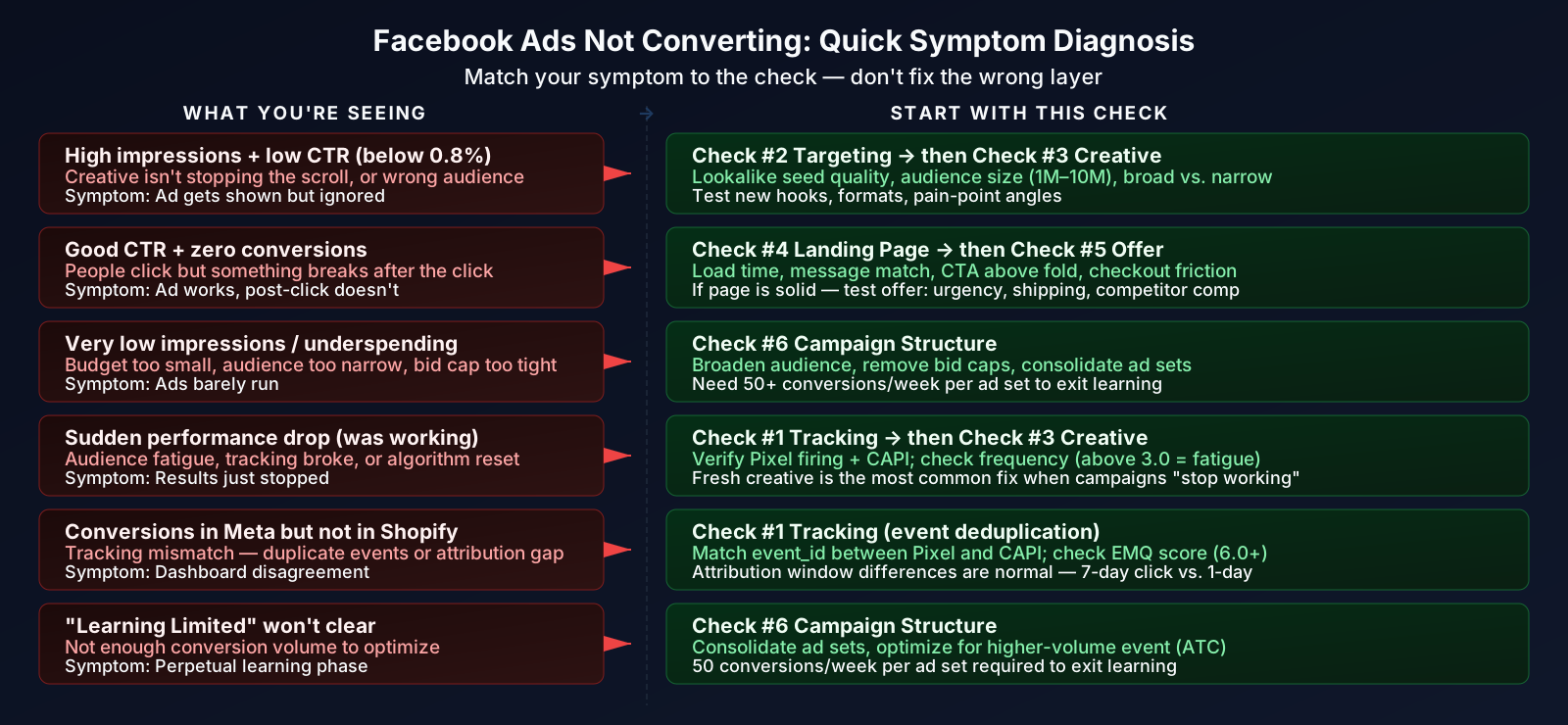
Before you change anything, pull up your Ads Manager and figure out which symptom pattern matches yours. This narrows down where the problem actually lives.
| Symptom Pattern | What It Usually Means | Start With Check # |
|---|---|---|
| High impressions + low CTR (below 0.8%) | Creative isn't grabbing attention, or you're showing ads to the wrong people | Check #2 (Targeting) or #3 (Creative) |
| Good CTR + no conversions | People are interested but something breaks after the click: landing page, offer, or checkout | Check #4 (Landing Page) or #5 (Offer) |
| Very low impressions | Budget too small, audience too narrow, or bid cap too aggressive | Check #6 (Campaign Structure) |
| Sudden performance drop (was working, now isn't) | Audience fatigue, tracking broke, or algorithm reset after edits | Check #1 (Tracking) or #3 (Creative) |
| Conversions in Meta but not in Shopify/analytics | Tracking mismatch: duplicate events, attribution window differences, or Pixel misfiring | Check #1 (Tracking) |
| "Learning Limited" status won't clear | Not enough conversion volume for the algorithm to optimize | Check #6 (Campaign Structure) |
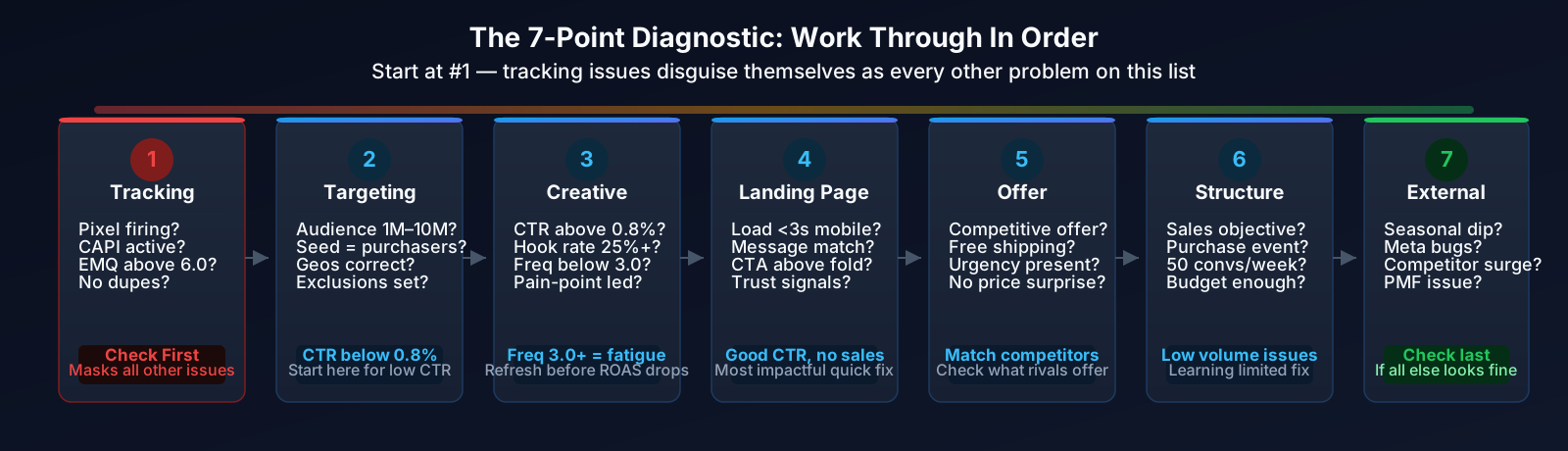
If you're not sure which pattern fits, start at Check #1 and work through in order. Tracking issues masquerade as every other problem on this list.
Warning: Don't make changes to live campaigns while diagnosing. Every edit resets Meta's learning phase. Diagnose first, then make changes in batches, not one tweak at a time.
Check #1: Is Your Tracking Actually Working?
I'm putting this first because it's the most overlooked cause of "no conversions." Your ads might actually be converting, but if Meta can't see those conversions, it can't optimize for more of them. And you'll think the ads are failing when the tracking is what's broken.
Verify Your Pixel and Conversions API (CAPI)
Open Events Manager in your Meta Business Suite. Check for these issues:
- Meta Pixel firing on all key pages: Install the Meta Pixel Helper Chrome extension. Visit your product page, add-to-cart, checkout, and thank-you page. The extension should show events firing on each one. If any page is missing, that's your problem.
- Conversions API (CAPI) is set up: Pixel-only tracking misses a huge chunk of conversions after iOS 14+. Go to Events Manager → Settings and confirm server-side events are flowing. If you're on Shopify, the native Meta integration handles this, but verify it's active.
- Event Match Quality (EMQ) score: In Events Manager, check the EMQ for your Purchase event. Below 6.0 is a problem. Low EMQ means Meta can't match your conversion data back to ad clicks. Fix this by passing more customer parameters (email, phone, IP) through CAPI.
- No duplicate events: If both Pixel and CAPI fire the same event without deduplication, you'll double-count (inflating numbers) or, worse, Meta's optimization gets confused. Check for event_id matching between Pixel and CAPI events.
- Use the Test Events tool: In Events Manager, go to Test Events. Trigger a test purchase and confirm the event appears. If it doesn't show up within a few minutes, your tracking chain is broken.
For a deeper look at iOS attribution and how it distorts your data, read our iOS attribution guide for ecommerce.
If your ads show conversions on 7-day click but nothing on 1-day click, you might have a longer sales cycle than you think, not a conversion problem. Switch your Ads Manager columns to show both windows side by side. Many ecommerce brands lose visibility on 20–30% of conversions by only checking 1-day click attribution.
Check #2: Are You Targeting the Right People?
If your tracking is solid but CTR is below 0.8% on cold traffic, the problem is often who you're showing ads to. Meta's algorithm is powerful, but it still needs reasonable inputs to work with.
Audit Your Audience Setup
Here's what to look for:
- Audience size: Too narrow (under 500K) starves the algorithm of options. Too broad (over 50M) wastes budget on unqualified impressions. For most ecommerce brands, 1M–10M is the sweet spot for prospecting.
- Lookalike seed quality: A lookalike built from your email list converts worse than one built from actual purchasers. Use your highest-intent seed: purchasers, repeat buyers, or high-AOV customers.
- Advantage+ audience expansion: Meta's Advantage+ can override your detailed targeting and show ads to a broader group. Check if this is enabled and whether your results improved or tanked after it kicked in. If performance dropped, try constraining it.
- Geographic targeting: Are you including regions where your product can't ship, or low-intent geos that click but never buy? Tighten to your core markets.
- Exclusion lists: If you're not excluding recent purchasers from prospecting campaigns, you're paying to re-acquire existing customers. Set up exclusion audiences for 30–60 day purchasers.
Not sure what your competitors are targeting? Our guide on reverse-engineering competitor targeting can give you useful angles to test.
Check #3: Is Your Creative Compelling?
Good targeting puts your ads in front of the right people. But if the creative doesn't stop the scroll, none of it matters. Here's how to tell if creative is the bottleneck.
Diagnose Creative Performance
Key metrics to check:
- CTR below 0.8% on prospecting: Your creative isn't earning attention. Test new hooks, formats, or angles. (For retargeting, CTR benchmarks are higher; 1.5%+ is typical.)
- Hook rate below 25% (for video): If fewer than 1 in 4 people watch the first 3 seconds, your opening is weak. Front-load the pain point or the most visual moment.
- Frequency above 3.0 on prospecting: Your audience has seen the ad too many times. This is creative fatigue, the single most common reason campaigns "stop working." You need fresh creative, not more budget.
- Ad copy talks features, not pain points: "Our product has X, Y, Z" doesn't convert as well as "Tired of X? Here's how we fixed it." Lead with what the customer cares about.
- Wrong format for the objective: Single images work for simple products. Carousels outperform for collections or multi-feature products. Video dominates for storytelling and cold audiences. Test formats, not just variations of the same format.
- Low social proof: An ad with 0 reactions and 0 comments looks like spam. If you're running multiple ad sets with the same creative, consolidate to stack social proof on one post ID.
Warning: Don't confuse creative fatigue with audience fatigue. If you swap in completely new creative and performance doesn't recover within 3–5 days, the issue might be audience exhaustion, not the ads themselves. Check frequency at the ad set level, not just the ad level.
Check #4: Is Your Landing Page Converting?
This is the most common reason for the "high CTR but no conversions" pattern. People click because the ad is compelling, then they land on a page that kills the momentum.
Audit Your Post-Click Experience
Run through this checklist on mobile (over 70% of Meta traffic is on phones):
- Page load time: Open Google PageSpeed Insights and test your landing page URL. If it loads in over 3 seconds on mobile, you're losing a significant chunk of visitors before they even see your page. Every extra second costs you roughly 7% in conversions.
- Message match: Does the landing page deliver what the ad promised? If the ad shows a specific product at $49 and the landing page is your homepage, there's a disconnect. Send traffic to the exact product page or a dedicated landing page that mirrors the ad's message.
- CTA above the fold: Can visitors take action (add to cart, sign up, buy) without scrolling? On mobile, this is critical. If they have to scroll past three paragraphs and a lifestyle image to find the button, you're losing them.
- Trust signals: Reviews, ratings, money-back guarantees, security badges, and real customer photos. Cold traffic from Meta doesn't trust you yet. Every trust element reduces friction.
- Checkout friction: Is guest checkout enabled? Are you requiring account creation? How many steps to complete a purchase? Are popular payment methods (Apple Pay, Google Pay, Shop Pay) available? Each friction point sheds buyers.
Show your landing page to someone unfamiliar with your brand for 5 seconds, then close it. Ask them: "What was being sold? What was the price? What should you do next?" If they can't answer all three, your page lacks clarity. Cold traffic from Facebook won't give you more than 5 seconds of attention.
Check #5: Is Your Offer Strong Enough?
Sometimes the ads work, the landing page works, but the offer just isn't compelling enough to close the deal. This is especially true in competitive niches where your audience is seeing 10 similar ads a day.
Evaluate Your Offer Against the Competition
Ask yourself honestly:
- Is 10% off actually compelling? For most products, no. It rarely moves the needle. Free shipping, a free gift with purchase, or a bundle discount tends to outperform small percentage discounts. A $10 flat discount often *feels* bigger than 10% off, even when it's the same amount.
- Are shipping costs a surprise? If shoppers see a $29 product, click through excited, and then find $8.99 shipping at checkout, that's a 30% price increase they didn't expect. Free shipping thresholds or baked-in shipping costs reduce cart abandonment significantly.
- What are competitors offering? If three competitors are running "Buy 2 Get 1 Free" and you're running "10% off your first order," you're losing the comparison. Use our competitor ad research guide to see what's live in your space.
- Is there urgency? "Shop now" without a reason to act now is just noise. Limited-time pricing, low-stock notices, or seasonal relevance give people a reason to buy today instead of bookmarking and forgetting.
- Price vs. perceived value gap: If your product looks like it should cost $30 but you're selling it for $79, no amount of ad spend will fix that. Invest in product photography, unboxing content, and social proof to bridge the value gap.
Check #6: Campaign Structure & Settings
This is where I see a lot of self-managed campaigns go wrong. You can have great creative, a strong offer, and a solid landing page, but if the campaign settings are fighting against you, nothing converts.
Review Your Campaign Configuration
These are the most common structural mistakes:
- Wrong campaign objective: If you selected "Traffic" instead of "Sales" or "Conversions," Meta is optimizing for link clicks, not purchases. People who click aren't always people who buy. Always use the Sales/Conversions objective for ecommerce.
- Wrong conversion event: Optimizing for Add to Cart instead of Purchase tells Meta to find people who add things to carts, not people who actually buy. If you have enough purchase volume (50+/week per ad set), optimize for Purchase directly.
- Learning Limited status: Meta needs roughly 50 conversions per week per ad set to exit the learning phase and optimize effectively. If you're spending $20/day with a $50 CPA, the math doesn't work: you'll get ~2.8 conversions/week, not 50. Solutions: increase budget, broaden audience, consolidate ad sets, or optimize for a higher-volume event (like Add to Cart) temporarily.
- Too many ad sets splitting the budget: Running 8 ad sets at $15/day each means none of them get enough data to optimize. Consolidate to 2–3 ad sets and give each one enough budget to hit the 50-conversion threshold.
- Advantage+ Shopping vs. manual campaigns: Advantage+ Shopping campaigns can work well for established accounts with strong Pixel data. But if you just launched or have thin conversion history, manual campaigns with defined audiences often outperform. Test both, but don't default to Advantage+ blindly.
- Bid cap or cost cap too aggressive: If you set a $15 cost cap but your realistic CPA is $25, Meta won't spend your budget. It'll just stop showing ads. Start without bid caps, establish your true CPA, then introduce caps gradually.
Check #7: External Factors
You've checked everything above and it all looks fine. Before you tear your hair out, consider that the problem might not be your ads at all.
Rule Out External Causes
These won't show up in your Ads Manager metrics, but they absolutely affect conversions:
- Seasonality: Post-holiday (January–February), mid-summer, and back-to-school transitions all create natural dips. If your performance dropped after Black Friday/Cyber Monday, that's probably not a campaign problem. It's consumer behavior normalizing.
- Platform-wide issues: Meta has bugs. Reporting delays, delivery glitches, and algorithm updates happen multiple times a year. Check the Meta Status page and advertising communities (Reddit r/FacebookAds, Twitter) to see if others are experiencing the same thing.
- Competitor activity spike: More advertisers in the auction = higher CPMs = higher cost per conversion. If your CPM jumped 30%+ without targeting changes, it's likely increased competition, especially around holidays, product launches, or seasonal peaks.
- Economic conditions: Consumer spending tightens during economic uncertainty. If you sell non-essential goods and conversion rates dropped across *all* channels (not just Meta), the issue is demand, not ads.
- Product-market fit: This is the hard truth nobody wants to hear. If your organic traffic doesn't convert either, if your email list doesn't buy, if nothing is working across any channel, the problem might not be advertising. It might be the product, the price, or the market.
The Fix-It Priority Order
If you've gone through all 7 checks and found multiple issues, here's the order I'd fix them in. This is based on impact and how frequently each issue is the actual root cause:
- Tracking: Fix this first. Everything else is unreliable if your data is wrong.
- Landing page: Best first fix for "clicks but no conversions." A 1% conversion rate improvement can change the whole funnel.
- Creative: Fresh creative is the most common fix for campaigns that "stopped working." Test new hooks, formats, and angles, not just new colors on the same ad.
- Campaign structure: Wrong objective or learning limited status silently tanks performance. Quick settings fixes can create immediate improvement.
- Targeting: Often less impactful than you'd think with Meta's algorithm, but still matters for cold traffic efficiency.
- Offer: Test different incentives and price framing. This one takes longer to iterate on but can be the difference between a 1% and 3% conversion rate.
- External factors: If everything else checks out, monitor and adapt. Sometimes the right move is to pause and wait for better conditions rather than throwing more money at the problem.
Don't try to fix everything at once. Pick the most likely culprit based on your symptom pattern from the diagnostic table above, fix it, give it 5–7 days to show results, then move to the next one.
Every time you make a change to your campaigns, write down what you changed, when, and why. Meta's algorithm needs 3–7 days to adjust after significant edits. Without a log, you'll forget what caused what, and you'll either revert a good change too early or leave a bad one running too long.
What "Good" Looks Like After Fixing
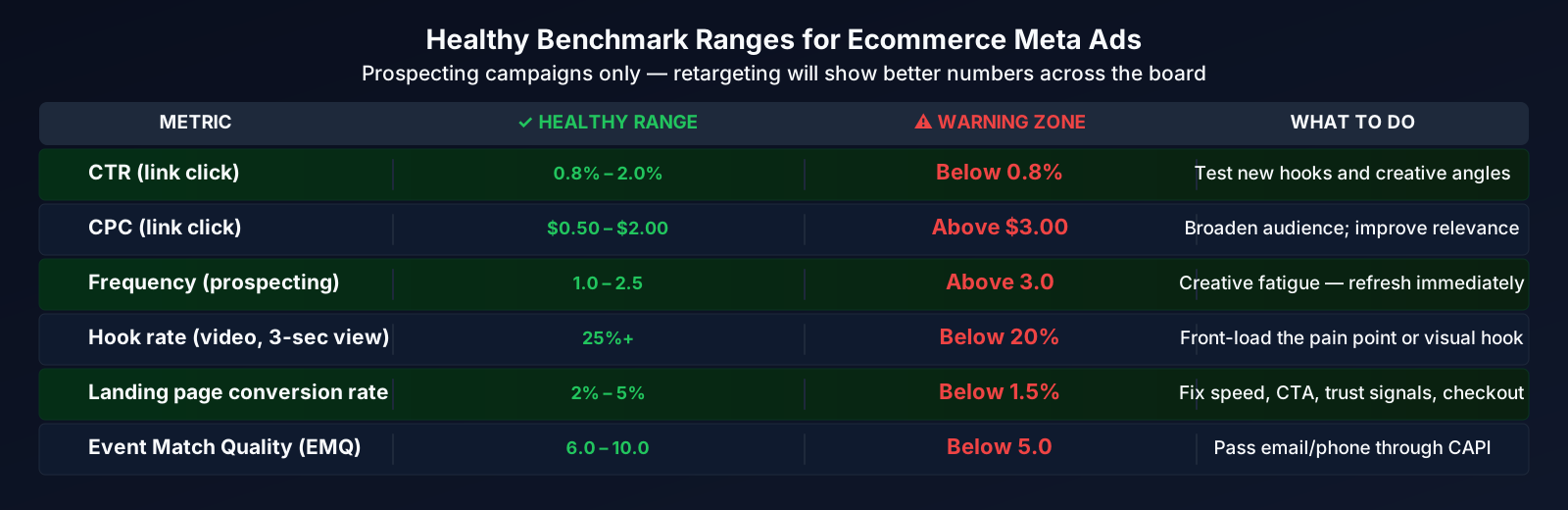
For reference, here are healthy benchmark ranges for ecommerce Meta ads. If you're hitting these after working through the checklist, your ads are in solid shape. (For more detailed benchmarks, see our ROAS benchmark guide.)
| Metric | Healthy Range (Prospecting) | Warning Zone |
|---|---|---|
| CTR (link) | 0.8% – 2.0% | Below 0.8% |
| CPC (link click) | $0.50 – $2.00 | Above $3.00 |
| Frequency | 1.0 – 2.5 | Above 3.0 |
| Hook rate (video) | 25%+ | Below 20% |
| Landing page conversion rate | 2% – 5% | Below 1.5% |
| ROAS (cold traffic) | 1.5x – 2.5x | Below 1.2x |
| Event Match Quality | 6.0+ | Below 5.0 |
Warning: These benchmarks are for cold prospecting campaigns. Retargeting will naturally show better numbers across the board (higher CTR, higher ROAS, lower CPC). Don't compare prospecting to retargeting. They're different jobs with different standards. If you're blending them together in reporting, you'll make bad decisions.
Ready to Spy on Your Competitor's Ads?
See exactly what's working for your competitors, and what's not. Analyze their creative, offers, and angles to sharpen your own campaigns.
Try Free ToolWhat to remember
-
Diagnose before you fix. Use your symptom pattern (high CTR + no sales, low impressions, sudden drop) to narrow down which check to start with. Random changes waste time and reset Meta's learning.
-
Check tracking first, always. Broken Pixel or CAPI setups cause more "no conversions" panics than bad ads. Get your Event Match Quality above 6.0 and verify events are firing correctly before changing anything else.
-
Creative fatigue is the #1 reason campaigns "stop working." Frequency above 3.0 on prospecting is a clear signal. Refresh creative every 2–4 weeks to stay ahead of it.
-
The landing page is usually the best first fix for the "clicks but no sales" pattern. Load time under 3 seconds, message match with the ad, clear CTA above the fold, and frictionless checkout.
-
Campaign structure mistakes silently kill performance. Wrong objective, learning limited status, and too many ad sets splitting budget are easy fixes that can improve results quickly.
-
Fix one thing at a time, then wait 5–7 days. Meta needs time to re-optimize after changes. Stacking multiple changes makes it impossible to know what worked.
-
Sometimes it's not your ads. Seasonality, platform bugs, competitor surges, and product-market fit issues all look like "ads not converting" from inside Ads Manager.